Compare VPN Providers Side-By-Side — Speed, Streaming, Price & Privacy
Every VPN claims to be “fast and secure,” but real performance depends on infrastructure, tunneling protocols, server load, and transparency. This guide compares top providers using public audits, independent testing labs, streaming reliability, and long-term user experience.

Why one VPN can be faster than another
Two people can install the same VPN and get different results depending on distance from the server, protocol, congestion or ISP throttling. Services like NordVPN, ExpressVPN and Surfshark use next-gen protocols designed for low latency — WireGuard, Lightway or NordLynx. Older VPNs on outdated OpenVPN builds usually show higher latency and slower peak speeds.
Real-world testing shows that next-gen protocols can outperform older tunnels by a huge margin on fiber, 4G and 5G. That’s why streaming can feel smooth on one VPN and laggy on another, even with the same internet speed.
Major providers at a glance
These well-known VPNs are included because they publish audits, run modern protocols and have active development. Each has different strengths:
NordVPN
Known for fast speeds with NordLynx, RAM-only servers and independent no-logs audits. Strong for streaming and everyday privacy.
ExpressVPN
Uses Lightway protocol for stable performance. Wide global server coverage and strong streaming reliability.
Surfshark
Unlimited devices, fast global speeds, Smart DNS for TVs and an audited no-logs policy. Popular for multi-device households.
Proton VPN
Open-source apps, strong transparency, based in Switzerland. Great for privacy and advanced users.
Mullvad
Extreme privacy — no email needed, accept cash, open-source, no marketing fluff. Ideal for anonymity.
CyberGhost & PIA
Large server networks, strong streaming support, user-friendly apps. Good long-term pricing.
Speed & protocol differences
In public testing from platforms like Ookla and Cloudflare Radar, next-gen protocols consistently deliver lower overhead, meaning less speed lost during encryption. Most major VPNs now support WireGuard or Lightway. Proton VPN publishes transparency reports showing how server load affects throughput, and NordVPN has built its own optimized variation of WireGuard (NordLynx).
Because VPN providers manage different data centers, routing paths can vary. ExpressVPN runs its own Lightway protocol designed to reconnect instantly when changing networks — useful on mobile and travel. Surfshark performance is strong on multi-device households because the protocol keeps devices in sync even with many connections active.
| Provider | Main Protocol | Server Type | Good For |
|---|---|---|---|
| NordVPN | NordLynx (WireGuard-based) | RAM-only | Speed + streaming |
| ExpressVPN | Lightway | RAM-only | Global consistency |
| Surfshark | WireGuard | RAM-only | Multiple devices |
| Proton VPN | WireGuard / OpenVPN | Secure core + open-source | Privacy & transparency |
| Mullvad | WireGuard | Open-source | Anonymous usage |
If you have 500 Mbps or 1 Gbps internet, a VPN using modern tunneling usually keeps performance smooth. Older OpenVPN-only providers tend to drop more speed under heavy encryption or long distances.
Streaming performance across major platforms
Global streaming tests from reviewers and tech publications repeatedly show that NordVPN, ExpressVPN and Surfshark are among the most consistent options for Netflix, Disney+, Prime Video and BBC iPlayer. Proton VPN also performs well, though some libraries may require switching servers.
- NordVPN – reliable on Netflix, Prime Video, Hulu and regional libraries
- ExpressVPN – strong consistency for BBC iPlayer and sports channels
- Surfshark – unlimited devices make it ideal for families
- Proton VPN – strong on privacy, good on streaming but sometimes requires server switching
Pricing & long-term value
Pricing is one of the biggest differences between VPNs. Some have low first-year discounts and higher renewal prices later, while others maintain transparent long-term pricing. Many providers also include a 30-day money-back guarantee, which is helpful for first-time users who just want to test streaming or public Wi-Fi protection.
| Provider | Monthly | 1-Year Plan | Money-Back Policy |
|---|---|---|---|
| NordVPN | ~$12.99 | ~$59–$67 / year | 30 days |
| ExpressVPN | ~$12.95 | ~$80–$100 / year | 30 days |
| Surfshark | ~$12.95 | ~$47–$60 / year | 30 days |
| Proton VPN | ~$9.99 | ~$65–$70 / year | 30 days |
If you only browse casually and want privacy on public Wi-Fi, any of these plans work. But if multiple people in your home use Smart TVs, Fire Stick, laptops and mobiles at the same time, unlimited device support from Surfshark can be practical.
Tip: renewal pricing is often different from first-year discounts. Checking official pricing pages avoids confusion later.
Device limits & Smart TV support
Most users now use VPNs across multiple devices: smartphones, laptops, work PCs, and smart TVs. Device limits matter because some households have 5 to 10 devices logged in at the same time.
| Provider | Simultaneous Devices | Smart TV Support | Smart DNS |
|---|---|---|---|
| NordVPN | 6 | App + Manual setup | Yes |
| ExpressVPN | 8 | Native app on many TVs | Yes |
| Surfshark | Unlimited | App + Smart DNS | Yes |
| Proton VPN | 10 (depends on plan) | Manual setup | Limited |
Smart DNS is especially helpful on devices where VPN installations are not possible — like Apple TV, PlayStation, Xbox, and some Samsung or LG TVs. It only changes the streaming region, so speeds remain fast, but IP-level privacy stays the same.
Gaming latency & stability
Gamers care about ping, not just download speed. VPN routing can reduce or increase latency depending on how close the exit server is. Some VPNs are optimized for gaming traffic, reconnect quickly if Wi-Fi drops, or avoid packet loss on unstable networks.
- ExpressVPN: Lightway is known for smooth handoffs between Wi-Fi and mobile networks.
- NordVPN: NordLynx provides fast routing on nearby servers.
- Surfshark: stable on multiple devices, useful if gaming + streaming happen at same time.
Public Wi-Fi security
Public hotspots in airports, cafés and hotels often monitor traffic or inject analytics scripts. A VPN encrypts your connection so passwords, logins and banking data cannot be intercepted by someone on the same network. Some providers also auto-activate protection when you join unknown Wi-Fi.
Privacy, audits & transparency
Privacy matters when choosing a VPN. Providers that allow independent audits show confidence in their infrastructure. Many have moved to RAM-only servers, meaning data wipes every time the server restarts. Some providers also make their apps open-source, letting researchers test them publicly.
- NordVPN: multiple Deloitte audits, RAM-only servers
- ExpressVPN: Deloitte audits, Lightway is open-sourced
- Surfshark: no-logs audit, RAM-only servers
- Proton VPN: open-source apps + security audits
- Mullvad: extreme transparency, no accounts or email needed
Providers that regularly publish transparency reports are more reliable long-term. These reports document outages, law enforcement requests, server seizures or code reviews.
Which VPN fits which user?
Best overall balance
NordVPN or ExpressVPN — strong speeds, privacy, streaming and consistent audits.
Best for unlimited devices
Surfshark — supports entire households without limits.
Best for strict privacy
Mullvad or Proton VPN — open-source, transparent, and minimal data collection.
Best for Smart TVs
ExpressVPN and Surfshark — Smart DNS + native apps on many TV devices.
All providers listed here are reputable and actively maintained. The right choice depends on your location, devices, streaming needs and privacy expectations. Testing apps for a few days is always the easiest way to know which one feels faster on your connection.
Frequently Asked Questions
Does a VPN make me fully anonymous online?
No tool can guarantee 100% anonymity. A VPN hides your IP address and encrypts your traffic, but websites can still identify users using cookies, browser fingerprints and account logins. VPNs are a strong privacy layer, not a complete identity shield.
Why do streaming platforms sometimes detect VPNs?
Services like Netflix, Disney+, and Amazon Prime block IP ranges identified as datacenter or shared exit networks. Picking a nearby server, clearing cache, switching Smart DNS or smart routing often fixes the issue.
Is it legal to use a VPN?
Yes in most countries. Many offices, universities, journalists and businesses rely on VPNs daily. Some countries restrict VPN usage, so users should always follow local laws.
Will a VPN slow down my connection?
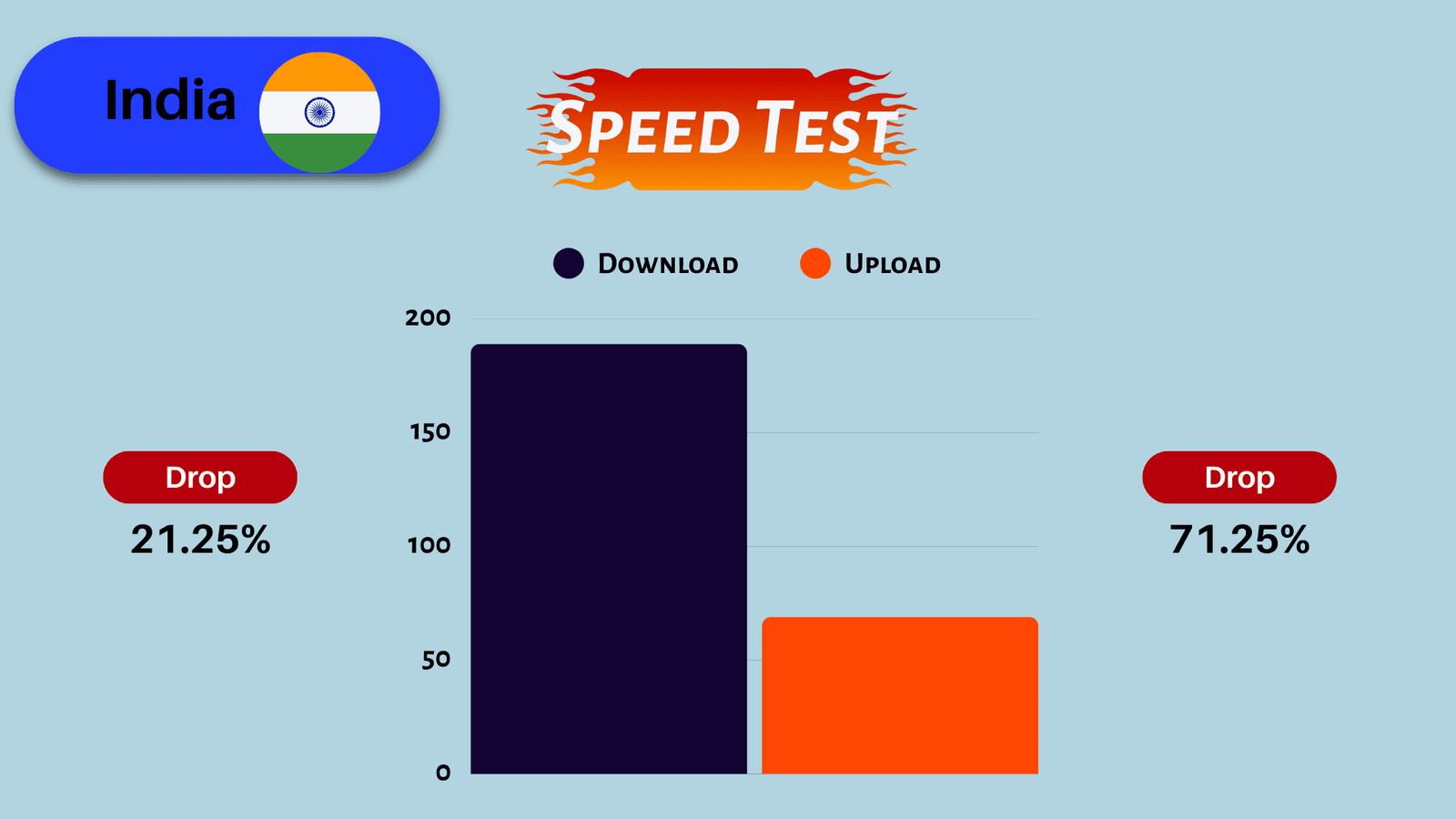
There is always a small overhead due to encryption, but modern VPN protocols like WireGuard and Lightway reduce delay. Choosing a nearby server keeps speeds fast for streaming and video calls.
Can I use one VPN on multiple devices?
Most providers allow at least 6–10 devices, and some offer unlimited connections. This helps cover mobile, laptop, smart TV and work PCs at the same time.
Similar Posts
How Hackers Exploit Public Wi-Fi (And Why a VPN Saves You)
Why Public Wi-Fi Is a Hacker’s Playground (And How a VPN Protects You) 1. Introduction In coffee shops, airports, hotels, and malls, public Wi-Fi is everywhere — and hackers know it. These open networks seem harmless, but they’re prime hunting grounds for cybercriminals looking to steal your personal information, intercept your login details, or install…
Best VPNs for Streaming & Netflix (Fast, Buffer-Free Test Results)
Home / Best / Best VPNs for Streaming & Netflix Best VPNs for Streaming & Netflix (Fast, Buffer-Free, Real Test Results) We tested leading VPNs across multiple regions to see which ones unlock Netflix, Disney+, Prime Video, Hulu, Hotstar, BBC iPlayer and more — without buffering or random proxy errors. Below you’ll find verified streaming…
Best Free VPNs Without Logging – Safe & Secure No-Log Choices
Best Free VPNs Without Logging – Safe & Trusted Privacy Options Most free VPNs look attractive on the surface: no subscription, quick access, simple setup. But here’s the truth — many “free” VPNs are not free at all. If a VPN doesn’t charge you money, it may be earning from your data. Some free VPNs…
WireGuard vs OpenVPN Battery Life: Which Protocol Drains Your Phone?
If you leave your VPN on 24/7, you have likely noticed your phone dying faster. This brings up the ultimate debate for mobile users: WireGuard vs OpenVPN battery usage—which one is actually efficient? In 2025, modern smartphones are powerful, but VPN encryption still demands heavy processing power. We tested both protocols on iOS and Android…