Top Secure Browsers & Extensions for Private Browsing (Technical Guide)
A modern browser is more than a window to the Internet. It is a data collection point for advertisers, hidden trackers, analytics scripts, fingerprinting engines, and profiling systems. A privacy-focused browser reduces this exposure dramatically — but not all browsers are built the same. This guide ranks the most secure browsers and the best extensions that block ads, trackers, and invisible logging, using technical criteria rather than marketing slogans.
What Makes a Browser “Private”?
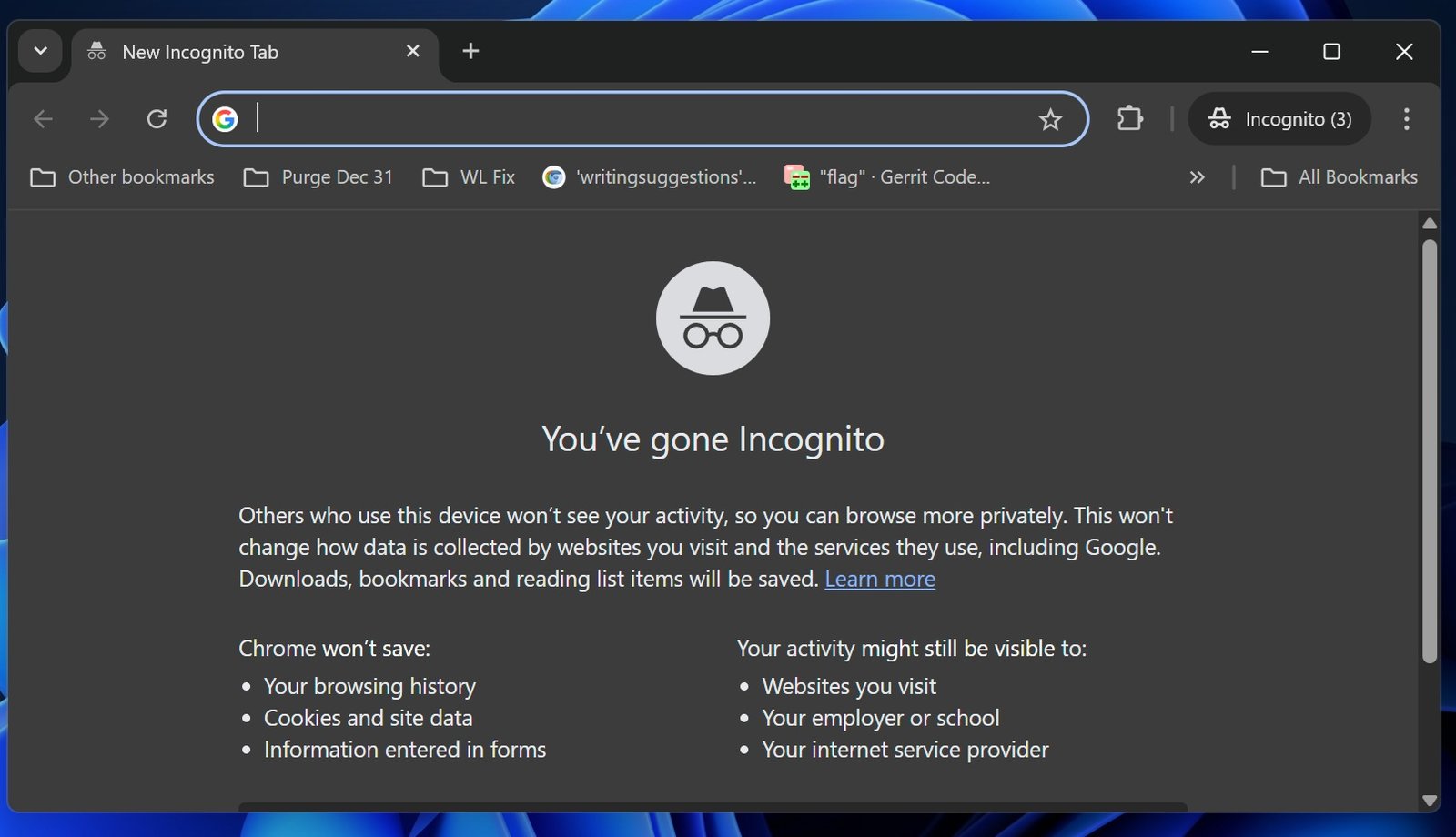
A truly private browser does not rely on incognito mode alone. Incognito removes local history and cookies, but it does not stop websites, ISPs, or analytics engines from tracking users. Real privacy requires network-layer protection, script-level blocking, isolation containers, anti-fingerprinting measures, and encrypted communication with DNS and destination servers.
Key Technical Requirements
- Tracker and fingerprinting protection at the browser level
- Strict HTTPS enforcement to block downgrade attacks
- Built-in ad blocking or extension support
- Private DNS or DNS-over-HTTPS capability
- Open-source codebase or audited transparency
- No hidden telemetry or data handoff to advertisers
Most “normal” browsers leak data by default. Advertisers track browsing behavior using cookies, scripts, and device fingerprinting. Private browsers reduce this exposure drastically — sometimes without needing extra extensions.
How This Ranking Works
Browsers in this list are ranked based on technical privacy controls, open-source transparency, and community reputation. This is not a commercial ranking — every browser listed is selected because of real security engineering, independent audits, and consistent performance in privacy testing.
- Brave Browser
- Mozilla Firefox (Enhanced Privacy Mode)
- Tor Browser (Highest anonymity)
- DuckDuckGo Browser
- LibreWolf (Hardened Firefox fork)
1. Brave Browser — Strong Default Privacy & Built-In Ad Blocking
Brave is a Chromium-based browser designed for privacy from the start. While many browsers require privacy extensions, Brave ships with shield controls already enabled. It blocks ads, trackers, third-party cookies, fingerprinting scripts, cross-site tracking, and unwanted pop-ups by default. No setup required.
Unlike standard Chrome, Brave does not forward user data to an advertising ecosystem. Requests are routed in a way that minimizes exposure, and fingerprint randomization reduces tracking accuracy. Brave also forces HTTPS upgrades when available, closing downgrade vulnerabilities.
Brave’s privacy report shows how many requests were blocked. While not a critical feature, it helps users visualize the hidden tracking occurring on the web. The browser also integrates DNS-over-HTTPS and private search, reducing metadata leakage through DNS.
Official website for transparency reports and updates:
brave.com
Who Should Use Brave?
- Beginner or non-technical users
- Users who want privacy without configuration
- Anyone tired of ads and pop-up tracking
Brave offers a balanced mixture of privacy and usability. It does not require Tor-level complexity, and it performs well for everyday browsing, streaming, and social media. The default security posture is strong, making it a top recommendation for most users.
2. Mozilla Firefox — Open-Source & Highly Customizable
Firefox remains one of the most respected browsers in the privacy community. It is open-source, independently audited, and controlled by a non-profit foundation rather than an advertising company. Firefox exposes advanced privacy toggles, such as Enhanced Tracking Protection, which blocks fingerprinting scripts, crypto-miners, and cross-site requests.
Firefox supports multiple privacy modes. Standard mode provides basic protections, while Strict mode blocks tracking aggressively — sometimes breaking poorly designed websites, which is expected behavior when scripts violate privacy standards. Users who want full control can modify advanced settings in about:config, although the default settings already perform well.
Mozilla offers full documentation on tracking protection, DNS-over-HTTPS integration, and HTTPS enforcement. Their engineering teams publish research showing how web tracking evolves and how defensive tools adapt. This is why cybersecurity researchers trust Firefox’s transparency.
Official documentation for privacy features:
support.mozilla.org
Who Should Use Firefox?
- Users who want open-source transparency
- Technical users who want control over settings
- People who prefer extensions and customization
Firefox works perfectly with privacy-focused extensions such as uBlock Origin and Privacy Badger. Users can also enable Enhanced Tracking Protection to block thousands of hidden analytics engines silently in the background. Performance remains strong even with multiple tabs.
3. Tor Browser — Maximum Anonymity Through Onion Routing
Tor stands apart from all other browsers. Instead of blocking trackers at the browser level, Tor routes traffic through a multi-layer encrypted network. Every connection passes through multiple nodes, hiding the user’s IP address from both websites and network observers. This level of anonymity is unmatched.
Tor is also hardened against fingerprinting. All users share a nearly identical browser signature, making profiling extremely difficult. However, Tor is slower than Brave or Firefox because of the routing structure. It is not necessary for everyday browsing — but when privacy is critical, Tor is the strongest option available to the public.
Official Tor Project:
torproject.org
Tor is ideal for journalists, activists, researchers, and anyone who cannot risk network-level tracking. For daily usage, Brave or Firefox provide a faster experience with strong privacy.
4. DuckDuckGo Browser — Simple Privacy for Mobile & Desktop
DuckDuckGo’s browser is built around a single idea: remove as much tracking as possible without requiring the user to configure anything. It blocks hidden third-party scripts, aggressive advertising networks, and cross-site profiling. Because the browser uses DuckDuckGo Search by default, no search queries are stored or profiled for advertising.
DuckDuckGo includes automatic tracker encryption, forcing secure connections when possible. Their documentation shows how many tracking requests are silently blocked, giving the user a sense of how much data is normally collected behind the scenes.
Official site:
duckduckgo.com
Who Should Use DuckDuckGo?
- Mobile-first users
- Users who want instant privacy without settings
- Anyone looking for a direct alternative to Chrome or Safari
DuckDuckGo does not provide the same depth of customization as Firefox or Brave, but it removes the learning curve. For people who want a private browser with no configuration required, it is one of the simplest choices.
5. LibreWolf — Hardened Firefox Without Telemetry
LibreWolf is a privacy-focused Firefox fork with hardened security settings. It removes all telemetry, disables advertising IDs, strengthens anti-fingerprinting defenses, and uses stricter content blocking. Many privacy professionals prefer LibreWolf because it applies expert-level configuration out of the box.
LibreWolf is fully open-source and community maintained. It is popular in the cybersecurity and Linux communities, where transparency matters. While it does not have the mainstream recognition of Brave or Firefox, its configuration is considered one of the strongest for users who want Firefox privacy without manual tweaking.
Project information:
librewolf.net
Hint: Users who love Firefox’s flexibility but want a stronger default configuration often choose LibreWolf.
Why Chrome and Edge Are Not Recommended
Google Chrome and Microsoft Edge are fast and convenient, but their business models rely on data profiling. Chrome ships with tracking-friendly defaults, extensive telemetry collection, and ad-friendly policies. While users can install privacy extensions, the browser still operates inside an advertising ecosystem.
Edge is based on Chromium and inherits many of the same tracking pathways. Both browsers allow fingerprinting and profiling scripts unless blocked manually. With privacy-first browsers available for free, there is little reason to keep browsing with tracking-heavy platforms.
Best Privacy Extensions (Works on Firefox, Brave, Chrome, LibreWolf)
Even with a private browser, extensions can add extra protection — especially against trackers and fingerprinting. However, extensions should be installed carefully; some “ad blockers” are spyware themselves. The tools below are trusted by cybersecurity experts and open-source communities.
1. uBlock Origin — Lightweight Ad & Tracker Blocker
uBlock Origin is one of the most respected open-source privacy tools. It blocks ads, tracking scripts, malicious domains, and cryptocurrency miners. Unlike many ad blockers, uBlock Origin does not sell “acceptable ad” exceptions or allow advertisers to bypass filters.
It is efficient, fast, and consumes minimal memory. The developer community maintains extensive block lists that disable tracking code on millions of websites.
Official GitHub:
github.com/gorhill/uBlock
2. Privacy Badger — Learns & Blocks Trackers Automatically
Privacy Badger was created by the Electronic Frontier Foundation (EFF). It uses behavioral detection: if a script appears to track a user across multiple sites, Privacy Badger blocks it automatically.
Unlike fixed block lists, Privacy Badger adapts over time. This makes it powerful against newly deployed trackers or domains that attempt to evade fingerprint lists.
Official EFF page:
privacybadger.org
3. HTTPS Everywhere — Force Encrypted Connections
HTTPS Everywhere ensures that, whenever possible, the browser upgrades connections to HTTPS. This prevents downgrade attacks, SSL stripping, and data interception on public networks.
Although modern browsers handle HTTPS upgrades automatically, HTTPS Everywhere still helps in older sites or misconfigured servers — especially on public Wi-Fi.
Developed by EFF:
eff.org/https-everywhere
4. NoScript — Script-Level Control
NoScript blocks JavaScript, Java, and other executable content until manually approved. This extension is powerful, but requires user understanding. Security professionals, penetration testers, and privacy researchers commonly use it to control dangerous scripts.
For regular users, NoScript may break certain sites — but for high-risk browsing, it provides unmatched control.
Layering Privacy Tools Creates Real Protection
No single browser can stop every tracking vector. Advertisers now use fingerprinting, canvas tracking, device metrics, and behavioral profiles. A browser with strong privacy settings + a reputable ad blocker reduces this exposure massively.
- Browser stops cookies and fingerprinting
- uBlock Origin blocks hidden scripts
- Privacy Badger blocks trackers that bypass lists
- HTTPS Everywhere enforces encrypted traffic
With these combined, tracking drops close to zero — without slowing the browser or breaking performance.
Fingerprinting Protection — The New Battle in Browser Privacy
Advertisers once relied on cookies. When browsers blocked cookies, trackers evolved. Today, fingerprinting allows websites to identify a user by collecting small hardware and software details: screen size, GPU, fonts, WebGL info, timezone, audio stack, installed languages, and hundreds of micro-signals. When combined, these signals create a unique fingerprint.
Private browsers include anti-fingerprinting defenses:
- Firefox Strict Mode: blocks fingerprinting scripts and reduces unique identifiers
- Brave: randomizes fingerprint data so tracking fails
- Tor Browser: makes every user look identical — strongest protection
- LibreWolf: pre-hardened privacy patches from day one
Users can test fingerprint resistance through open-source testing tools and privacy score sites to see how “unique” their browser appears.
Browser Sandboxing & Security Layers
Privacy is not only about blocking ads — it is about stopping malware and malicious scripts. Modern browsers isolate each tab into a sandbox. If one tab is compromised, the malware cannot easily attack the device.
Chromium-based browsers (including Brave) offer strong sandboxing. Firefox also maintains a robust sandbox system that isolates risky web processes. Tor adds its own network-level isolation, ensuring each domain uses separate circuit paths. These layers reduce the impact of phishing pages, malicious JavaScript, or drive-by downloads.
A privacy browser acting as both a shield (blocking tracking) and armor (sandboxing exploits) delivers real security — not just marketing.
DNS Privacy Matters — Even With HTTPS
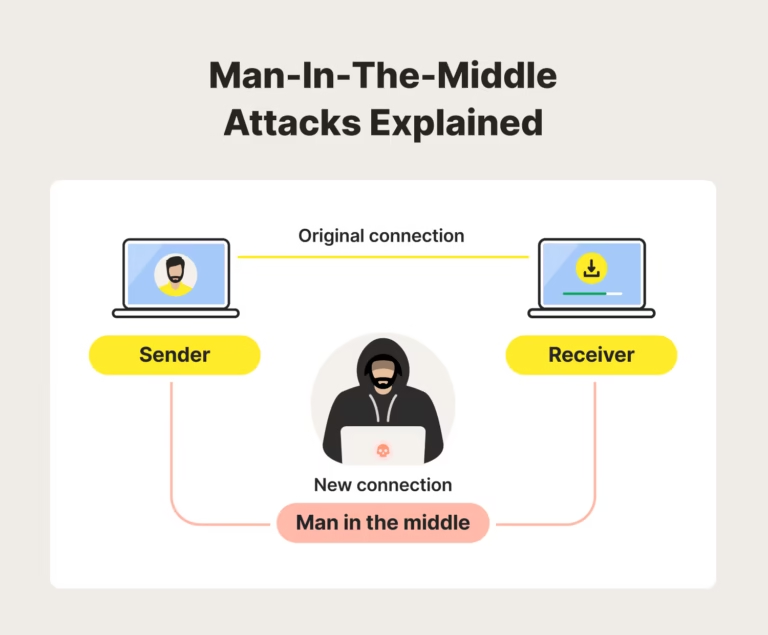
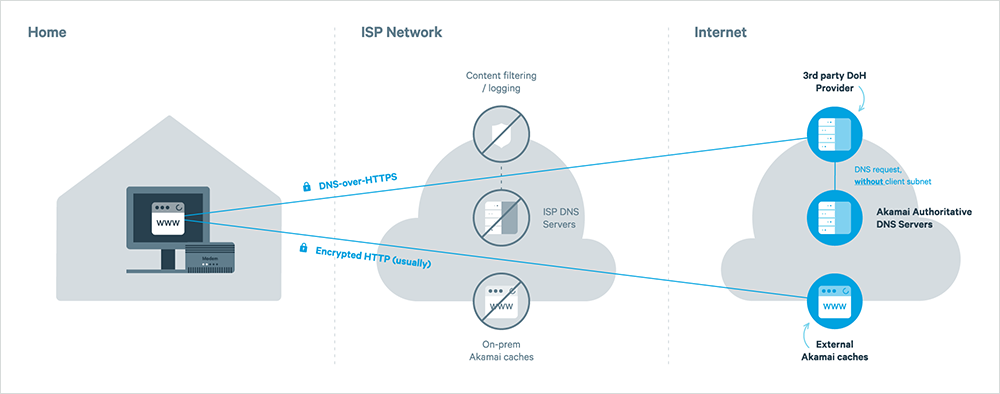
Users often assume HTTPS protects everything. It protects content, but not DNS. Before reaching a site, the browser must resolve the domain into an IP address. If DNS is not encrypted, observers can see every site the user tries to visit. That includes ISPs, hotspot owners, and middle networks.
Modern secure browsers solve this using:
- DNS-over-HTTPS (DoH)
- DNS-over-TLS (DoT)
Firefox and Brave support DoH natively. Tor routes DNS through the onion network. LibreWolf forces secure DNS by default. When combined with HTTPS, DNS privacy closes a major visibility hole.
Search Engines Matter Too
A private browser is pointless if the search engine tracks everything. Traditional search platforms store:
- Search history
- Clicked results
- Location & device signals
- Behavioral profiles for advertising
Private search engines such as DuckDuckGo and Startpage remove personal identifiers and avoid behavioral logging. Brave Search takes a similar approach, indexing results without tracking users. For desktop and mobile, pairing a private browser with a private search engine prevents data profiling at the entry point of browsing.
What About Password Managers?
Many browsers include built-in password storage, but system-level password managers or dedicated tools offer stronger security. Browser password vaults become risky if the device is compromised. Dedicated tools encrypt vaults separately, add 2FA, and generate secure credentials. Privacy browsers do not require this, but they benefit from it.
Ranking Summary — Which Browser Should You Choose?
There is no single “best for everyone.” Each browser fits a different type of user:
- Brave: Best default privacy + performance + usability
- Firefox: Best for customization and open-source transparency
- Tor Browser: Best for anonymity and highest security situations
- DuckDuckGo: Best for simple, instant privacy (mobile users)
- LibreWolf: Best hardened Firefox experience without telemetry
Users who want the simplest experience gravitate toward Brave or DuckDuckGo. Technical users who prefer control choose Firefox or LibreWolf. Tor is a specialized tool: unbeatable for privacy, but not required for shopping or watching YouTube.
Private Browsers + VPN = Full Network Privacy
A browser blocks scripts and trackers inside the webpage. A VPN protects traffic outside the webpage. Using both stops data collection at two levels:
- Browser: blocks trackers, scripts, profile identifiers
- VPN: hides IP address, encrypts traffic, protects DNS
Users who want to test whether their browser and VPN leak IP or DNS data can use online privacy testing tools. We provide a full list of testing utilities on our
VPN Tools page for IP checks, WebRTC leak tests, and DNS leak detection.
Final Conclusion
Private browsing is no longer a niche concept. With modern browsers and open-source privacy tools, users can eliminate most tracking without losing convenience. Whether someone chooses Brave, Firefox, DuckDuckGo, LibreWolf, or Tor, each delivers stronger protection than standard advertising-driven browsers.
When combined with script blockers, fingerprint protection, encrypted DNS, and a trustworthy VPN, browsing becomes both private and secure, even on public networks. Privacy does not require technical knowledge — just the right tools.
The Internet will always contain advertisers, analytics engines, and hidden scripts. But with modern secure browsers, those systems lose visibility — and the user regains control.