Security Automation for Web Applications – Testing, Scanning & Monitoring for Vulnerability Prevention
Meta Description: Discover how security automation protects web applications through continuous testing, scanning, and monitoring — preventing vulnerabilities before they cause damage.
Introduction
The internet runs on web applications — from online banking portals to e-commerce dashboards and API-driven services. But every dynamic component, plugin, or deployment creates a new potential entry point for attackers. In this environment, traditional manual security testing simply can’t keep up. That’s where security automation for web applications steps in — combining artificial intelligence, continuous monitoring, and real-time testing to protect systems automatically.
Modern organizations adopt automation not to replace humans, but to empower them. Automated scanners can identify thousands of potential vulnerabilities in minutes, leaving cybersecurity teams free to analyze critical findings and design stronger defences. The result: faster releases, fewer breaches, and stronger compliance with frameworks like ISO 27001, GDPR, and OWASP Top 10.
What Is Security Automation?
Security automation refers to using scripts, machine learning, and security orchestration tools to automatically identify, triage, and even remediate vulnerabilities in web applications. Rather than waiting for scheduled audits, automation integrates directly into development and operations pipelines — scanning new code, testing APIs, and monitoring live servers in real time.
Key objectives include:
- ✅ Early detection of critical bugs before production release.
- ✅ Consistent testing across all builds with zero human bias.
- ✅ Reduced response time to exploit attempts or data leaks.
- ✅ Streamlined compliance reporting and evidence collection.
Why Security Automation Is Essential
According to global threat-intelligence data, over 60 % of web app breaches stem from misconfigurations, outdated dependencies, or unpatched code. With manual checks, discovering such issues takes weeks; automation finds them in seconds. The approach shifts security from a reactive posture to a continuous protection model.
- ⚙️ Speed: Automated pipelines detect flaws during every deployment.
- 🧠 Predictive defense: Machine learning recognizes patterns of attacks before exploitation.
- 📈 Scalability: One automated engine can cover hundreds of web apps simultaneously.
- 💰 Cost reduction: Fewer manual tests and faster remediation lower long-term expenses.
Key Components of Web Application Security Automation
1. Automated Vulnerability Scanning
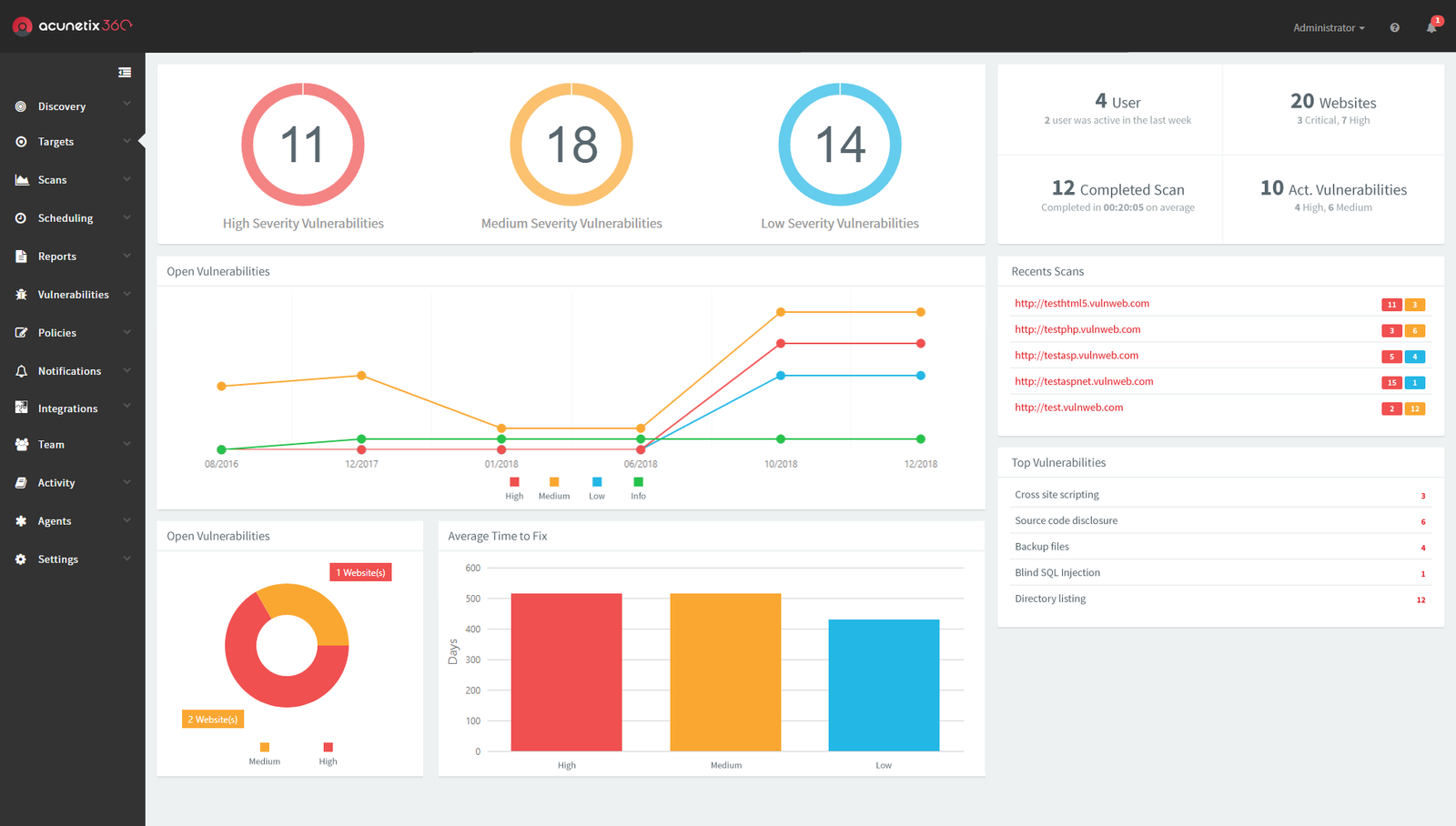
Tools like OWASP ZAP and Acunetix continuously crawl and audit every endpoint in a web app — identifying issues such as SQL injection, cross-site scripting (XSS), weak authentication, or exposed admin panels. These scanners integrate into CI/CD pipelines, automatically generating reports and alerting developers the moment a vulnerability is found.
2. Static and Dynamic Application Security Testing (SAST & DAST)
Static testing (SAST) analyzes source code or binaries without executing them, identifying insecure functions and data-handling flaws. Dynamic testing (DAST) performs simulated attacks on live environments to see how the app behaves under stress. Combining both ensures full coverage. Popular frameworks include SonarQube and Burp Suite.
3. Dependency and Package Monitoring
Most vulnerabilities hide inside open-source libraries. Automation tools such as Snyk and Dependabot continuously check project dependencies, alerting teams when a package update introduces a known CVE. Some can even auto-patch code or open pull requests to fix the issue before release.
4. Configuration and Policy Enforcement
Automated configuration analysis validates web-server headers, TLS settings, and content-security policies. Cloud-based tools like Prisma Cloud or AWS Security Hub ensure all workloads comply with internal and regulatory baselines. The automation flags misconfigurations instantly, reducing human oversight errors.
5. Real-Time Threat Monitoring
Continuous monitoring platforms collect logs from servers, APIs, and firewalls, using correlation rules and AI analytics to detect intrusions. SIEM systems such as Elastic Security or Splunk can automatically trigger responses — blocking malicious IPs or isolating affected instances.
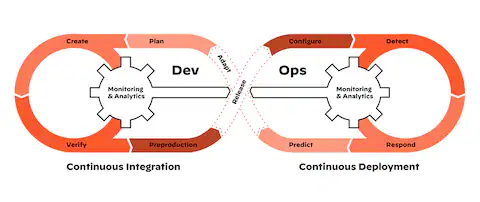
Integrating Automation into CI/CD Pipelines
To achieve seamless security automation, each pipeline stage should have built-in tests:
- Commit Stage: Code is pushed to Git; SAST checks run instantly.
- Build Stage: Dependency checks via Snyk or Trivy.
- Test Stage: DAST and API scans via OWASP ZAP.
- Deploy Stage: Infrastructure scanning and container policy validation.
- Monitor Stage: Runtime agents feed data into SIEM dashboards.
This tight feedback loop means developers get actionable insights before vulnerabilities reach production. The same principle applies to cloud-native DevOps pipelines using Jenkins, GitHub Actions, or GitLab CI.
Popular Automation Frameworks & Tools
- OWASP ZAP & Burp Suite Pro: For dynamic scanning of endpoints and session handling.
- SonarQube & Bandit: For static analysis of codebases in Java, Python, etc.
- Snyk & Dependabot: For dependency security and auto-patching.
- Trivy & Clair: For container image scanning.
- Splunk & Elastic SIEM: For centralized log monitoring and alert correlation.
Benefits of Automated Web App Security
- Continuous Protection: Threats are caught as soon as they appear.
- Reduced Human Error: Consistent scans minimize oversight mistakes.
- Developer Empowerment: Security feedback integrated directly into IDEs and pipelines.
- Data-Driven Insight: Metrics like MTTD and MTTR become measurable performance indicators.
With automation, web-security maturity evolves from reactive patching to proactive defense. This transformation aligns directly with DevSecOps principles — embedding protection into every development phase rather than treating it as a post-release audit.
Real-World Example: Automated Defense in Action
Imagine a fintech startup deploying new features every week. During a nightly build, the automated pipeline runs OWASP ZAP scans and discovers a reflected XSS vulnerability in a new dashboard module. Within minutes, the system opens a GitHub issue tagged “critical,” assigning it automatically to the responsible developer. At the same time, Snyk reports a vulnerable npm package. Both issues are fixed before sunrise — no downtime, no exploitation.
Without automation, that flaw might have persisted for weeks, exposing customer data. This example reflects the power of combining automation, visibility, and accountability — the three pillars of modern web security.

Challenges of Implementing Automation
Despite its advantages, automation comes with complexity. Integrating too many tools can cause alert fatigue or overlapping reports. Teams must also maintain the scanners themselves — ensuring API keys, version updates, and false-positive tuning remain accurate.
Another challenge is culture: developers often see security as a blocker. Successful automation balances speed and safety, integrating quietly without disrupting CI/CD velocity.
Up next: advanced topics such as AI-driven threat correlation, SOAR integration, Zero-Trust monitoring, and automation metrics — building the complete second half of this guide.
Advanced Layers of Security Automation
Modern security automation extends far beyond scanning and reporting. The next generation of systems uses machine learning, real-time orchestration, and automated response workflows to strengthen web-application security across every layer. These advanced methods form the backbone of what’s now called autonomous security operations.
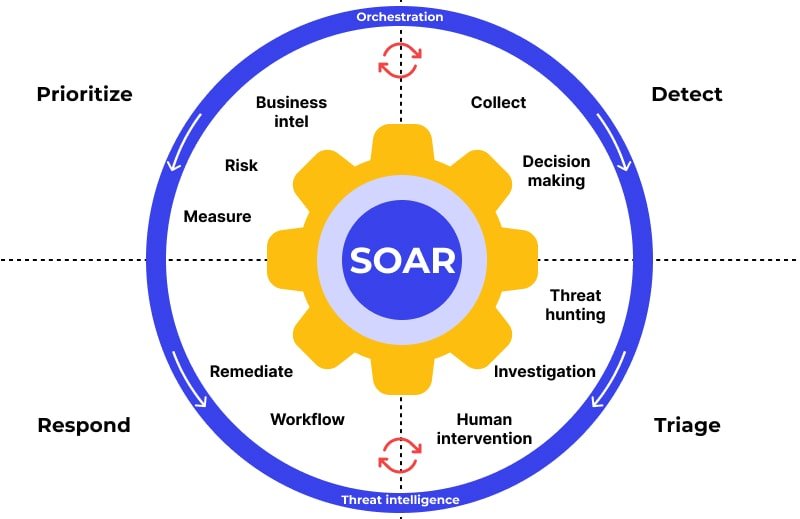
1. SOAR – Security Orchestration, Automation, and Response
SOAR platforms combine threat intelligence, automated workflows, and case management. They automatically correlate alerts from scanners, firewalls, and SIEM tools into actionable tickets. For example, if a web-application vulnerability is exploited, the SOAR platform can instantly trigger a mitigation workflow: blocking the attacker’s IP, notifying developers, and even rolling back a vulnerable release.
Top tools in this category include Cortex XSOAR by Palo Alto Networks, Splunk SOAR, and IBM Security SOAR.
2. AI-Driven Threat Correlation
Artificial intelligence analyzes massive event data streams from application logs, web traffic, and endpoint telemetry. Instead of rule-based matching, these engines recognize subtle behavior deviations — unusual POST requests, rare user agents, or rapid authentication failures — that may signal zero-day exploitation attempts. AI correlation tools like Darktrace and Microsoft Sentinel learn your environment’s baseline and automatically raise alarms only when anomalies occur.
3. Automated WAF and Bot Mitigation
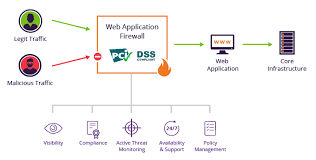
Web Application Firewalls (WAFs) are no longer static filters. With automation, they dynamically adjust their rules based on ongoing attacks. Cloud-based WAF services like Cloudflare WAF and AWS WAF combine signature-based blocking with behavioral analytics. They detect and stop botnets, SQLi payloads, and scraping attempts automatically — keeping APIs clean and performance stable.
4. Cloud-Native Security Automation
For teams deploying on AWS, Azure, or GCP, automation extends into infrastructure. Cloud-native services like AWS Security Hub or Google SCC continuously scan cloud configurations for risky permissions, unencrypted storage, and exposed public endpoints. They can even trigger auto-remediation using predefined playbooks.
5. Zero-Trust Monitoring and Access Control
The zero-trust model assumes no device, IP, or session is inherently safe. Automation platforms enforce conditional access dynamically — validating device compliance, geolocation, and user behavior at every request. Identity-based access tools such as Okta and Cisco Duo integrate seamlessly with web-app automation layers to enforce least-privilege policies in real time.
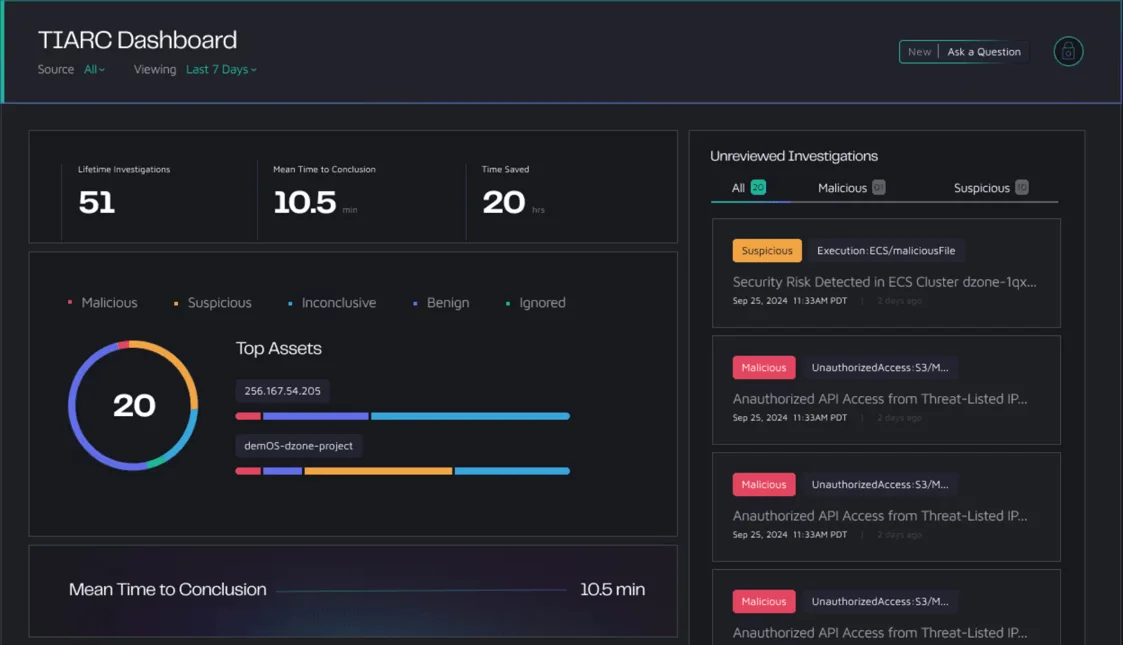
Security Automation Metrics and KPIs
To measure performance, mature security teams track automation effectiveness using these key indicators:
- MTTD (Mean Time to Detect): Measures how quickly the system detects threats.
- MTTR (Mean Time to Respond): Tracks how long it takes from detection to mitigation.
- Scan Coverage: Percentage of total assets scanned automatically.
- Automation Rate: Percentage of incidents handled without manual intervention.
- False-Positive Ratio: Ensures alert precision and analyst efficiency.
These KPIs feed back into dashboards, allowing teams to tune scanners, improve AI precision, and refine response workflows continuously.
Integration Example: From Alert to Auto-Fix
Here’s how an automated web-application defense might work in practice:
- An API endpoint is scanned by OWASP ZAP in the nightly build — detecting a potential injection flaw.
- The scanner automatically reports findings to the team’s issue tracker via API.
- SOAR receives the alert, checks context from the SIEM, and triggers a script to block the exploit pattern in the WAF.
- A Jira ticket is created for review while an automated patch pipeline prepares a safe hotfix.
- After retesting, the SOAR marks the issue “resolved,” updating compliance logs automatically.
This workflow occurs in minutes, often before attackers even discover the same vulnerability. That’s the power of orchestrated automation.
Human + Machine Collaboration
Automation doesn’t eliminate security engineers — it amplifies them. Machines handle repetitive, high-volume scanning and correlation; humans interpret, contextualize, and prioritize complex scenarios. Successful organizations combine both through integrated DevSecOps culture, where security feedback loops are embedded in development and QA processes.
Emerging Trends in Web App Security Automation
- 🧠 AI-Generated Patches: New platforms auto-generate remediation code suggestions for developers.
- ☁️ Serverless Security: Automated scanners designed for AWS Lambda, Google Cloud Functions, and Azure Functions.
- 🔒 Privacy-Aware Logging: Real-time log sanitization to meet GDPR/CCPA without losing threat visibility.
- 🧩 Unified Dashboards: Single panes that merge WAF, SIEM, and DevOps telemetry into one automated control view.
FAQs on Web Application Security Automation
Can automation fully replace manual penetration testing?
No. Automation accelerates routine tasks but human creativity is essential to discover logic flaws, privilege-escalation paths, and business logic vulnerabilities that tools can’t simulate.
How often should scans run?
Ideally, automated scans run with every deployment and at least once daily in production. Continuous scanning ensures new vulnerabilities introduced by third-party components are caught early.
What’s the best automation stack for small teams?
A lightweight yet powerful setup: OWASP ZAP for scanning, Snyk for dependencies, Elastic SIEM for monitoring, and Cloudflare WAF for automated blocking.
Is security automation expensive to implement?
Not necessarily. Many tools offer free community editions or scalable pricing. The cost of automation is always lower than the financial and reputational loss from a single breach.
Conclusion
Security automation is transforming web-app defense from a reactive patchwork into a predictive, self-healing ecosystem. It gives teams 24/7 visibility, reduces false positives, and speeds up every phase of detection and response. The ultimate goal isn’t just to scan faster — it’s to build resilient systems that anticipate threats before they happen.
Whether you’re deploying microservices, maintaining enterprise APIs, or managing a startup SaaS, integrating security automation for web applications is no longer optional. It’s the foundation of trust, reliability, and continuous compliance in the digital era.
To further enhance your cybersecurity strategy, explore our VPN privacy checker and recommended VPNs for developers — essential layers for keeping both users and servers protected online.
Key Takeaway:
Automation doesn’t just protect code — it protects business continuity. The faster you automate, the harder it becomes for attackers to find a way in.