What Is Browser Fingerprinting?
When you open a website, you probably expect it to see your IP address and maybe drop a cookie.
What many people do not realise is that sites can also build a much deeper, almost unique profile
of your device and browser. This technique is called browser fingerprinting.
Browser fingerprinting is a method of identifying a user based on the unique combination of
settings, characteristics, and technical details exposed by their browser and device. It does
not need cookies, logins, or trackers in the traditional sense. Instead, it quietly collects
signals that, when combined, act like a digital fingerprint.
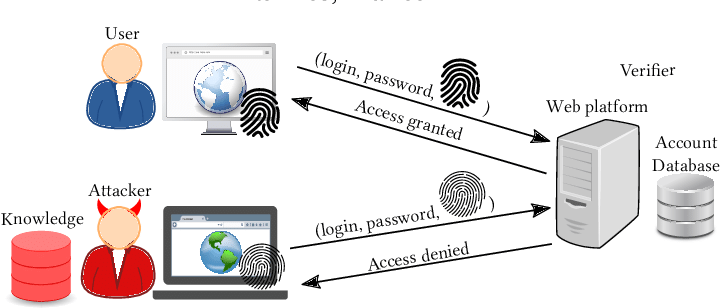
This fingerprint can be used to recognise you when you return to a website, follow you across
different pages, and sometimes even across different sites that share the same tracking scripts.
Even if you clear cookies or use “incognito mode”, your fingerprint may still reveal who you are
from a technical point of view.
combination of your browser and device characteristics to identify or track you online.
Why Browser Fingerprinting Exists
Browser fingerprinting was not originally designed as a shady tracking trick. It started as a
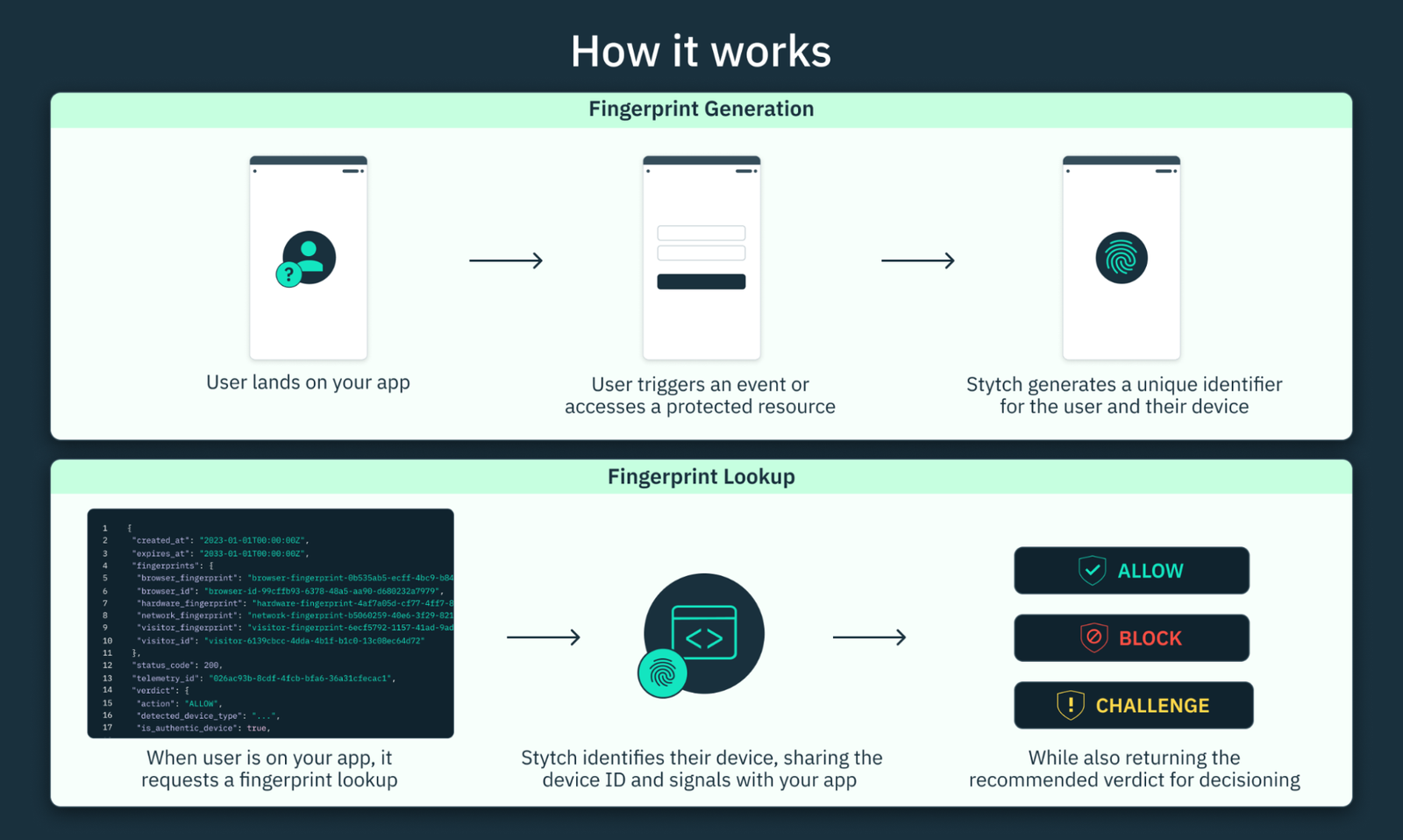
way to improve security and detect fraud. For example, if a banking website sees a login attempt
from a completely new device fingerprint, it may ask for an extra verification step. If it sees
the same account accessed from thousands of different fingerprints in a short time, it may flag
that as a takeover or bot attack.
Over time, advertisers and analytics companies realised the same technique could be used to
follow users more reliably than cookies. Cookies can be blocked, deleted, or expire. But a
fingerprint built from dozens of signals is harder to reset, especially for non-technical users.
Common Reasons Companies Use Browser Fingerprinting
- Fraud detection: spotting suspicious logins and payment attempts.
- Account security: triggering extra checks when a new device appears.
- Ad tracking and profiling: following users without relying only on cookies.
- Analytics and A/B testing: grouping user sessions to study behaviour.
Some of these uses are legitimate and protect users, while others push privacy boundaries.
Understanding how the technique works helps you decide how comfortable you are with it and what
steps you want to take to reduce your exposure.
How Browser Fingerprinting Works
When you visit a website, your browser automatically shares certain information so the page can
be displayed correctly. Developers also use small pieces of JavaScript to query your system
and environment. None of this feels special on its own, but together it becomes powerful.
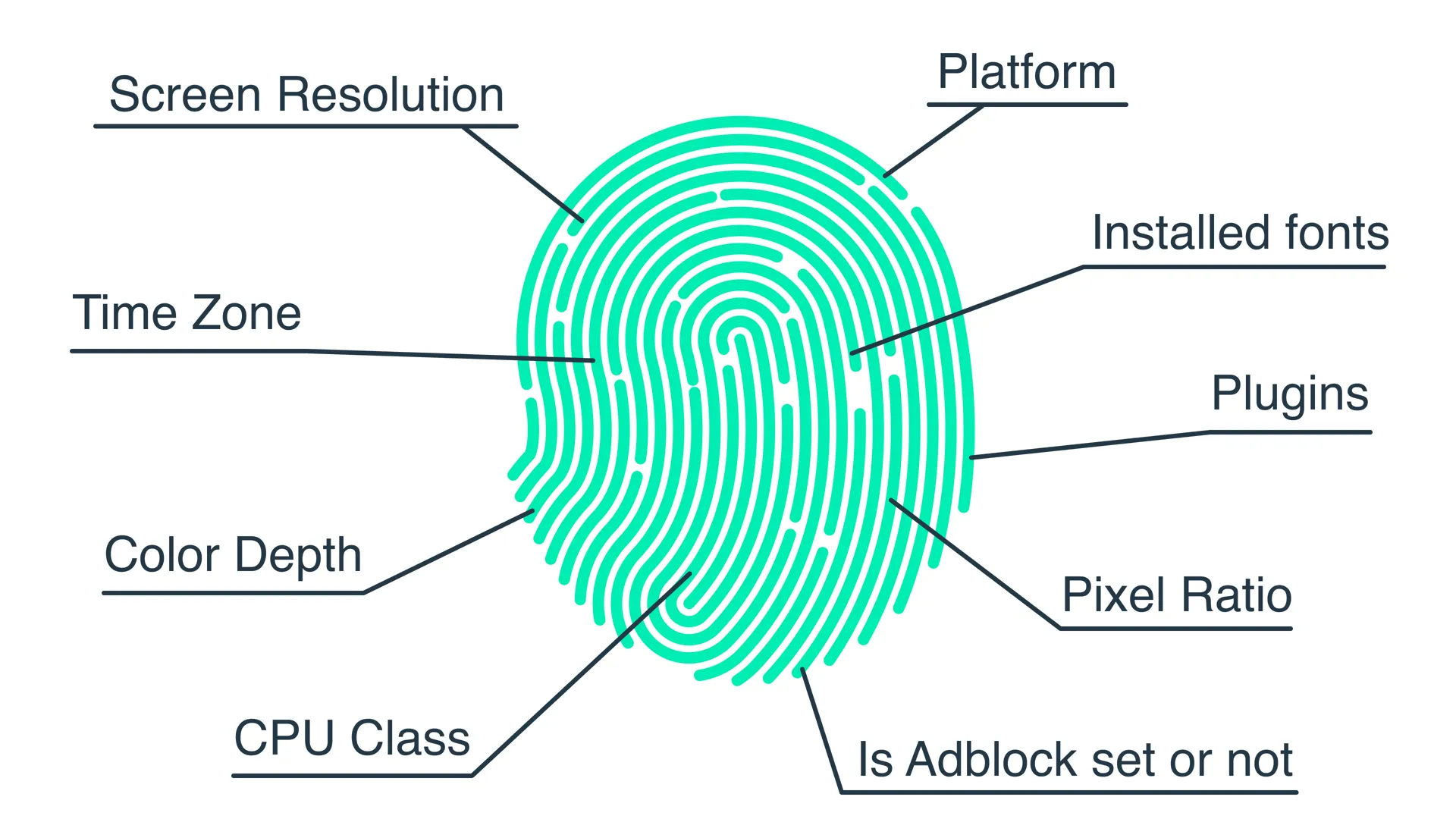
Think of your fingerprint as a long list of answers to questions like:
- What browser and version are you using?
- What is your operating system?
- What is your screen resolution and colour depth?
- Which fonts are installed?
- Is dark mode enabled?
- Which language and time zone is set?
- Is an ad blocker or privacy extension detected?
- Is hardware acceleration enabled, and which GPU do you have?
These data points are then combined into a hash or unique ID. Even if each piece of information
is not unique by itself, the combination often is. Two people might share the same browser and
operating system, but the exact combination of fonts, plugins, screen size, device model,
language, and time zone quickly becomes rare.
What Goes Into a Browser Fingerprint?
Not all websites collect the same details, but here are some of the most common ingredients.
1. Browser and Operating System Details
This includes the user agent string (which reveals browser type and version), the operating
system (Windows, macOS, Linux, Android, iOS), and sometimes the device type (desktop, tablet,
mobile). Combining these with minor version numbers already narrows down the pool of users.
2. Screen and Display Information
Websites can ask your browser for:
- Screen resolution (for example, 1920 × 1080)
- Available viewport size (the browser window area)
- Pixel ratio (useful for spotting Retina or high-DPI displays)
- Colour depth and orientation
This helps sites optimise layout, but it also contributes to your fingerprint.
3. Installed Fonts and Languages
One of the most powerful signals is your font list. Different operating systems and apps install
different fonts. By invisibly testing which fonts your browser can render, scripts can build a
near-unique pattern. Your preferred language settings and keyboard layouts add even more detail.
4. Plugins, Extensions, and MIME Types
Some browsers still expose information about installed plugins, supported media types, or even
hints about ad blockers and tracking protection. Even when extensions try to stay hidden, small
behaviour differences can reveal their presence, such as blocked scripts or missing resources.
5. Time Zone, Locale, and System Preferences
Your time zone, region, and locale settings help websites show correct dates and currency. They
also tell trackers roughly where you are in the world without using a precise GPS location.
Combined with your language, this can be surprisingly distinctive.
6. Canvas, WebGL and Hardware Features
Modern fingerprinting scripts use advanced browser APIs such as Canvas and WebGL. By asking your
browser to draw hidden graphics and then analysing tiny rendering differences, they can identify
graphics card models, drivers, and other subtle patterns. This is often called
canvas fingerprinting.
The result is that your hardware itself adds uniqueness, even if you run the same browser
version as millions of other people.
How Accurate Is Browser Fingerprinting?
The strength of a fingerprint depends on the number and quality of signals collected. Studies
have shown that for many users, the combination of all browser and device features is unique or
close to unique, especially on desktop systems with customised setups.
On mobile, there is a bit more similarity, because many people share the same device models and
operating system versions. Even there, small differences still help distinguish one user from
another over time.
reliably say “this is the same device we saw last time”, even if you are not logged in and have
deleted your cookies.
Fingerprinting vs Cookies: What Is the Difference?
Traditional tracking relies on cookies: small files stored in your browser that contain an ID
assigned by the website. If the cookie disappears, the site “forgets” who you are. This gives
users at least some control, because they can clear cookies, block third-party cookies, or use
private browsing.
Browser fingerprinting does not store anything on your device. Instead, it recalculates your
fingerprint every time you visit, based on information your browser exposes in real time. That
makes it:
- Harder to see: there is no simple “fingerprint file” to delete.
- Harder to block: it uses normal web features that many sites rely on.
- More persistent: changes require you to actually alter your setup.
From a privacy point of view, this feels more invasive, because it bypasses traditional user
controls and leans on technical complexity that most people never notice.
Advanced Types of Browser Fingerprinting
Browser fingerprinting has evolved far beyond simple system details. Modern tracking scripts use several
sophisticated techniques to extract subtle variations unique to your device. These methods operate silently
in the background and require no permission prompts or downloads.
1. Canvas Fingerprinting
This is one of the most well-known fingerprinting techniques. The website asks your browser to draw a hidden
image using the HTML5 Canvas API. Even though the image looks identical to human eyes, tiny differences in how
your GPU, drivers, operating system, and browser render the image form a unique pattern.
These microscopic variations in shading, anti-aliasing, and pixel rounding generate a hash that acts as a
stable identifier.
2. WebGL Fingerprinting
WebGL extends fingerprinting by querying deeper hardware information. It reveals:
- GPU model and vendor
- Supported WebGL extensions
- Shader precision details
- Rendering characteristics
Since graphics cards vary widely, this method produces highly unique fingerprints even among identical browsers.
3. AudioContext Fingerprinting
This lesser-known technique uses the Web Audio API to generate a sound in the background. It then analyzes
subtle differences in how your hardware processes the signal. These differences are influenced by the device’s
audio chipset, drivers, OS, and browser implementation.
Although quiet and invisible, the fingerprint is extremely powerful.
4. Battery, Sensors, and Performance APIs
Some browsers expose details such as battery level, charging time, motion sensors, and memory availability.
While individually harmless, combining them with other signals adds more uniqueness.
5. Network & TLS Fingerprinting
This includes:
- Your connection type
- TLS handshake characteristics
- Protocol support
- Cipher suite ordering
Security researchers often use this for bot detection and identifying automated traffic.
Why Browser Fingerprinting Is Difficult to Avoid
Unlike cookies, fingerprinting uses standard browser functions that are part of normal web operation. You
cannot simply “turn off” JavaScript or block request headers without breaking a large portion of websites.
Fingerprinting is resilient because:
- It does not store anything on your device.
- It recalculates on every visit.
- It relies on required browser signals.
- Blocking every signal would break essential website features.
- Most users cannot regularly change fonts, screen size, OS, or GPU.
but reducing uniqueness and unpredictability.
How Websites Use Browser Fingerprinting
Browser fingerprinting serves multiple industries. Some uses are beneficial, while others raise ethical concerns.
1. Security & Fraud Prevention
Banks and financial services use fingerprinting to detect suspicious login attempts.
If your account is suddenly accessed from a fingerprint that has never been seen before, the system may
require verification or automatically block the attempt.
2. Bot & Automation Detection
Modern bots often try to imitate real browsers. Fingerprinting helps detect abnormal behaviours:
- Inconsistent API responses
- Missing fonts and plugins
- Headless browser characteristics
- Duplicated fingerprints from many IPs
Anti-bot systems rely heavily on fingerprinting because it’s far more accurate than IP-based checks.
3. Personalization & Analytics
Websites may use fingerprinting to maintain consistency even if the user clears cookies.
This can support:
- Persistent session tracking
- Cross-device behaviour analysis
- User segmentation for A/B tests
4. Advertising & Cross-Site Tracking
This is the controversial use.
Advertisers can track people across the web by matching identical fingerprints across different pages.
It bypasses cookie policies, privacy tools, and even incognito mode.
Privacy Risks of Browser Fingerprinting
The main concern is loss of anonymity. Even if a fingerprint does not include your name, it acts as a stable
technical identity that follows you across the open web.
Major risks include:
- Cross-website tracking: seeing your behaviour across multiple unrelated sites.
- De-anonymization: combining fingerprint + IP + behaviour to identify you.
- Targeted advertising: creating interest profiles without consent.
- Price discrimination: detecting device type and adjusting prices.
- Government or corporate surveillance: following users without cookie consent.
As fingerprinting becomes more accurate, the risk of unintentional identification increases dramatically.
How to Reduce Your Browser Fingerprint
While completely avoiding fingerprinting is nearly impossible, you can lower its accuracy and uniqueness.
The goal is to look similar to many other users rather than standing out.
1. Use a Privacy-Focused Browser
Some browsers add noise or reduce fingerprinting signals.
Options include:
- Firefox with Enhanced Tracking Protection
- Brave browser (aggressive fingerprint randomization)
- Tor Browser (all users share the same fingerprint)
2. Disable or Limit JavaScript (when possible)
Fingerprinting relies heavily on JavaScript. Disabling it blocks many techniques, but also breaks many websites.
3. Use Content Blockers and Anti-Tracking Extensions
- uBlock Origin
- Privacy Badger
- NoScript
- CanvasBlocker
These can stop or spoof canvas fingerprinting and script-based trackers.
4. Standardize Browser Setup
Avoid extreme customizations such as unusual fonts, plugins, or obscure screen sizes.
The more “normal” your device looks, the harder it is to fingerprint uniquely.
5. Use a VPN (Helps Only Partially)
A VPN hides your IP, but fingerprinting still recognizes the same device.
This means VPNs are useful but not a full solution.
6. Change Browsers for Sensitive Tasks
Using a separate browser for activities like research, work, or sign-ins can reduce the fingerprint
continuity across websites.
How to Check Your Browser Fingerprint
Several online tools allow you to test how unique your browser fingerprint is.
These tools reveal what trackers can see at a glance:
- Device information
- Canvas hash
- WebGL fingerprint
- Audio fingerprint
- Font detection
- Network/TLS signature
Testing regularly helps you understand how changes in your setup affect your fingerprint.
Fingerprinting Inside Apps and Mobile Environments
Browser fingerprinting is not limited to websites. Mobile apps use similar techniques through device SDKs,
gaining access to:
- Device model
- OS version
- Installed apps (in some cases)
- Sensors
- Unique device identifiers
This creates an even stronger fingerprint because mobile devices expose more signals than desktop browsers.
Enterprise Use of Fingerprinting
Many organisations rely on fingerprinting as part of their security stack. It helps them detect unauthorized access,
monitor account sharing, and reduce automated traffic.
While useful, enterprises must balance security benefits with privacy expectations.
Common Enterprise Scenarios
- Preventing credential stuffing attacks
- Blocking malicious bots
- Detecting remote access tools or spoofed devices
- Identifying suspicious location changes
- Monitoring compliance in regulated industries
Is Browser Fingerprinting Legal?
The legality varies by country.
In regions with strong privacy laws (GDPR, CCPA), fingerprinting may require user consent, especially if used for
advertising or cross-site tracking.
However, fingerprinting used purely for security often falls under “legitimate interest”.
Final Conclusion
Browser fingerprinting is one of the most powerful and least visible tracking methods on the internet.
It combines dozens of data points from your browser, hardware, software, and device environment to generate a
unique identifier that can follow you across pages and sessions — even without cookies.
While fingerprinting has legitimate uses in security and fraud prevention, it also raises privacy concerns when
used for advertising, profiling, or cross-site tracking without user consent.
Reducing your fingerprint requires choosing the right browser, limiting scripts, using privacy tools, and avoiding
unusual settings that make your device stand out.
Understanding how fingerprinting works empowers you to take control of your online privacy and make informed
decisions about the tools and technologies you rely on every day.