1. Introduction: Why Online Privacy Is More Fragile Than You Think

Most people believe they are private online.
You close tabs, use incognito mode, maybe even install a VPN—and assume your activity is hidden. In reality, internet privacy is far more fragile than it appears. Many users are exposed without realizing it, even while using tools meant to protect them.
Every time you connect to the internet, small pieces of technical data are shared automatically. These pieces may look harmless on their own, but together they can reveal who you are, where you are, and how you use the internet.
This guide explains, in simple language, how online privacy actually works. You will learn what your internet connection reveals, what IP, DNS, and WebRTC leaks really mean, and why many VPN users are still exposed. More importantly, you will understand how to check your own privacy status and what “safe” truly means.
2. What Your Internet Connection Reveals About You
When you visit a website, your device does not arrive anonymously. It introduces itself using technical identifiers that help the internet function—but also enable tracking.
Your Public IP Address
Your public IP address is like a temporary digital address assigned by your internet provider. Websites can see it instantly. From this single identifier, they can usually determine:
- Your country
- Your city or region
- Your internet service provider (ISP)
In many cases, this information is accurate enough to identify your daily location patterns.
Your Network and Device Signals
Beyond IP addresses, websites can detect:
- Whether you are on mobile data or Wi-Fi
- Your browser type and version
- Your operating system
- Time zone and language settings
Even without logging in, this information helps create a fingerprint that can follow you across websites.
Why This Matters
This data is commonly used for advertising, analytics, regional restrictions, and security checks. However, in the wrong hands—or when combined across many sessions—it can be used for profiling, tracking, or surveillance without your awareness.
3. What Does “Online Privacy” Really Mean?

Online privacy is often misunderstood.
Many people confuse privacy with security or anonymity. They are related, but they are not the same.
Privacy
Privacy is about who can see your data and how much they can learn about you. It focuses on limiting exposure.
Security
Security is about protecting data from being stolen or altered, such as through hacking or malware.
Anonymity
Anonymity means your identity cannot be linked to your activity at all. This is much harder to achieve and requires more than just a VPN.
Common Privacy Myths
- Incognito mode does not hide your IP address
- Clearing cookies does not stop ISP tracking
- A VPN alone does not guarantee full privacy
Privacy is not a single feature you turn on. It is a combination of tools, settings, and habits working together.
4. What Is an IP Leak? (And Why It’s Dangerous)
An IP leak happens when your real IP address becomes visible—even when you believe it should be hidden.
How IP Leaks Happen
IP leaks can occur due to:
- VPN connection drops
- Improper VPN configuration
- Apps bypassing the VPN tunnel
- Network changes (Wi-Fi to mobile data)
In these cases, traffic may briefly or permanently escape the VPN tunnel and expose your real IP address.
Why IP Leaks Are a Serious Problem
If your real IP is exposed:
- Websites can identify your true location
- Streaming services may block or restrict access
- Advertisers can link activity back to you
- Authorities or ISPs may still see your traffic source
The most dangerous part is that IP leaks are often silent. Users rarely receive warnings when exposure happens.
5. DNS Leaks Explained in Plain English
DNS leaks are one of the most common and least understood privacy problems.
What DNS Actually Does
DNS (Domain Name System) acts like the internet’s phonebook. When you type a website name, DNS servers translate it into an IP address so your device knows where to connect.
What a DNS Leak Is
A DNS leak occurs when your DNS requests are handled by your ISP instead of your VPN’s DNS servers—even while the VPN is connected.
This means:
- Your ISP can see the websites you visit
- Your browsing activity is partially exposed
- Privacy protection is incomplete
Why DNS Leaks Are Risky
Even if your IP address appears hidden, DNS leaks can still reveal:
- Website domains you access
- Usage patterns
- Time-based browsing behavior
This defeats one of the main purposes of using a VPN.
6. WebRTC Leaks: The Hidden Privacy Threat
WebRTC leaks are one of the most overlooked privacy risks on the internet.
What Is WebRTC?
WebRTC (Web Real-Time Communication) is a browser technology that allows voice calls, video chats, and peer-to-peer connections directly inside the browser. It is used by many legitimate services, including video conferencing tools.
How WebRTC Causes Leaks
To function properly, WebRTC may expose:
- Your real IP address
- Your local network IP
- Network routing details
In some browsers, this happens even when a VPN is active. The VPN hides your traffic, but WebRTC bypasses it and reveals your real connection details directly to websites.
Why WebRTC Leaks Are Dangerous
WebRTC leaks are dangerous because:
- They happen silently
- Most users never know they exist
- They affect both VPN and non-VPN users
- They can expose location and identity instantly
Many users believe their VPN has failed, when in reality the browser is leaking data independently.
7. Can a VPN Really Hide Everything?
VPNs are powerful tools, but they are not magic.
What VPNs Do Well
A properly configured VPN can:
- Hide your public IP address
- Encrypt your internet traffic
- Prevent ISP-level monitoring
- Protect data on public Wi-Fi
What VPNs Cannot Do
A VPN cannot:
- Stop websites from tracking you via accounts
- Make you anonymous if you log into personal services
- Prevent browser-based fingerprinting alone
- Protect against unsafe browsing habits
The Reality
A VPN protects the connection, not the user behavior. If other layers leak data, privacy breaks down.
Understanding this difference is critical to using a VPN correctly.
8. Common Reasons VPNs Still Leak Your Data
Many privacy leaks happen not because VPNs are broken—but because they are incomplete.
Misconfigured VPN Settings
Default settings may:
- Allow traffic outside the VPN tunnel
- Fail to block DNS requests
- Ignore WebRTC behavior
Split Tunneling
Split tunneling allows certain apps or traffic to bypass the VPN. While useful for speed, it creates privacy gaps if misused.
Weak or Disabled Kill Switch
A kill switch blocks traffic when the VPN disconnects. Without it:
- Your real IP may be exposed during brief connection drops
- Network changes can trigger leaks instantly
Browser-Level Leaks
VPNs operate at the network level. Browsers operate independently. This is why DNS and WebRTC leaks are so common.
Free and Low-Quality VPNs
Many free VPNs:
- Use ISP DNS servers
- Lack proper leak protection
- Prioritize speed over privacy
- Do not maintain infrastructure securely
9. How to Check If Your Internet Connection Is Leaking
Checking your privacy exposure is the only way to know if you are truly protected.
What an IP Leak Test Shows
An IP test reveals:
- Your visible public IP address
- Your apparent country and location
- Whether your VPN is masking your real identity
What a DNS Leak Test Shows
A DNS test shows:
- Which DNS servers are handling your requests
- Whether your ISP is involved
- If your browsing activity is exposed
What a WebRTC Test Shows
A WebRTC test reveals:
- Hidden IP addresses
- Local network exposure
- Browser-based leaks
These tests work together. Passing one test does not guarantee full privacy.
10. Understanding Your Privacy Test Results
Privacy results are often misunderstood. Knowing what they mean is essential.
“Safe”
- Your IP is hidden
- DNS requests are secure
- No WebRTC exposure detected
This indicates strong protection—but still requires regular rechecking.
“Warning”
- Partial exposure detected
- Misconfiguration likely
- Privacy is inconsistent
This means protection exists but is unreliable.
“Exposed”
- Real IP visible
- DNS routed through ISP
- WebRTC leaking data
Immediate action is required to restore privacy.
Why Rechecking Matters
Privacy status can change:
- After VPN updates
- After browser updates
- When switching networks
- When traveling
Privacy is dynamic, not permanent.
11. Signs Your VPN Is Not Protecting You Properly
Many VPN users assume protection is active simply because the app is connected. In reality, several warning signs indicate that privacy may be compromised.
One of the most common signs is when websites still detect your real location or show region-specific content that should be hidden. This often means your real IP address is leaking or DNS requests are not protected.
Another red flag is when your internet connection briefly drops and reconnects without any notification. If your VPN does not block traffic during this gap, your real IP can be exposed without you noticing.
Unexpected changes in speed combined with exposure warnings are also important. While VPNs naturally reduce speed slightly, extreme fluctuations alongside location mismatches often signal routing issues or VPN instability.
If your VPN connects but fails to change your visible IP address, this is a clear indication that protection is not working as intended.
12. How High-Quality VPNs Prevent Leaks
Not all VPNs are built the same. High-quality VPNs invest heavily in preventing leaks at multiple layers.
Strong VPNs operate their own private DNS servers instead of relying on third-party or ISP infrastructure. This ensures that browsing requests remain encrypted and private from start to finish.
A reliable kill switch is another critical feature. When properly implemented, it instantly blocks all internet traffic if the VPN connection drops, preventing accidental exposure during network changes or temporary outages.
Advanced VPNs also include built-in WebRTC protection and IPv6 handling. Without these safeguards, modern browsers and networks can bypass the VPN tunnel entirely.
Independent security audits further strengthen trust. When a VPN allows external experts to verify its infrastructure and privacy claims, it demonstrates a serious commitment to user protection.
13. How to Choose a VPN That Actually Respects Privacy
Choosing a VPN based on speed alone is a common mistake. True privacy depends on deeper factors.
A transparent logging policy is essential. “No-logs” claims should be clearly explained, not hidden behind vague language. Privacy-focused VPNs specify exactly what data is and is not collected.
Jurisdiction also matters. VPNs based in regions with strong privacy protections face fewer legal obligations to retain or share user data.
Leak protection features should be available by default, not hidden in advanced settings. This includes DNS protection, kill switches, and WebRTC controls.
Finally, long-term reliability matters more than marketing promises. VPNs that maintain stable infrastructure and update security practices consistently are better suited for serious privacy needs.
14. Privacy on Public Wi-Fi: What Changes?
Public Wi-Fi networks introduce additional risks that many users underestimate.
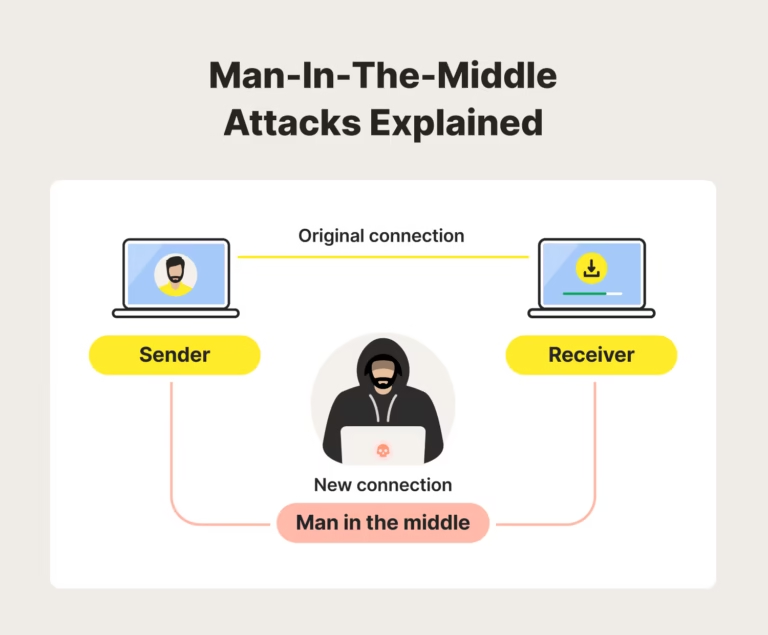
In places like airports, hotels, cafés, and malls, network administrators or malicious actors may monitor traffic. Without encryption, sensitive data can be intercepted or manipulated.
Even when websites use HTTPS, public networks can still expose metadata such as visited domains and connection timing. This information can be used for tracking or profiling.
Using a VPN on public Wi-Fi is not optional—it is essential. A properly configured VPN encrypts your traffic and prevents local network surveillance, significantly reducing exposure risks.
15. Browser Settings That Improve Privacy (Even With a VPN)
VPNs protect your network connection, but browsers control how your device communicates with websites. Both must work together.
Enabling secure DNS features helps prevent DNS leaks by ensuring requests remain encrypted. Modern browsers support this, but it often needs manual activation.
WebRTC behavior should be controlled or restricted to prevent IP exposure. Many browsers allow this through privacy settings or extensions.
Built-in tracking protection also plays an important role. Blocking third-party trackers reduces fingerprinting and cross-site profiling, even when a VPN is active.
A privacy-focused browser configuration significantly strengthens VPN protection and reduces silent leaks.
16. Mobile vs Desktop Privacy Risks
Privacy risks differ significantly between mobile devices and desktop systems.
On desktops, browsers are the primary source of leaks. WebRTC exposure, browser fingerprinting, and misconfigured DNS settings are more common. However, desktops usually provide better control over advanced privacy settings.
On mobile devices, the risks are often less visible but more persistent. Many apps communicate independently of browsers and may bypass VPN protection if not configured correctly. Some mobile operating systems also restrict how VPNs interact with background processes.
Mobile networks frequently switch between Wi-Fi and cellular data. Without a strong kill switch, this transition can briefly expose your real IP address.
In both cases, privacy depends not just on the VPN app, but on system behavior, network stability, and user awareness.
17. How Often Should You Check Your Privacy Exposure?
Privacy is not something you check once and forget.
You should recheck your exposure:
- After installing or updating a VPN
- After browser or operating system updates
- When switching between Wi-Fi and mobile networks
- When traveling or using public internet connections
- After changing VPN settings or protocols
Even small updates can change how traffic is routed. Regular testing ensures that protections are still working as expected.
A privacy check takes seconds, but it can prevent long-term exposure.
18. Privacy Is a System, Not a Tool
One of the biggest misconceptions about online privacy is believing that a single tool solves everything.
Real privacy is a system made up of:
- A properly configured VPN
- Secure DNS handling
- Browser-level protections
- Safe network habits
- Regular exposure checks
If one layer fails, the entire system weakens. Strong privacy comes from understanding how these layers interact and maintaining them consistently.
Tools help—but awareness is what makes them effective.
19. Final Verdict: Is Your Internet Connection Really Private?
For most people, the honest answer is: not completely.
Even users who install VPNs often remain partially exposed due to DNS leaks, WebRTC behavior, weak kill switches, or browser-level tracking. These leaks are rarely obvious, which makes them more dangerous.
True privacy is not about paranoia or extreme measures. It is about clarity—knowing what is visible, what is hidden, and what needs attention.
Once you understand how leaks happen and how to detect them, protecting your internet connection becomes much simpler and far more reliable.
20. Frequently Asked Questions
Can my internet provider see my activity if I use a VPN?
Your ISP cannot see the content of your traffic when a VPN is active, but it may still see that you are using a VPN unless additional measures are taken.
Does incognito mode hide my IP address?
No. Incognito mode only affects local browsing history. Your IP address remains visible to websites and network providers.
Are free VPNs safe for privacy?
Many free VPNs lack proper leak protection, use shared infrastructure, or collect user data. They may reduce privacy instead of improving it.
Can websites still track me when I use a VPN?
Yes. Websites can track you through accounts, cookies, browser fingerprints, and behavior patterns, even if your IP address is hidden.
How do I know if my VPN is actually working?
The only reliable way is to run IP, DNS, and WebRTC leak tests and understand the results.