In an era where digital privacy is no longer a luxury but a necessity, millions of users rely on Virtual Private Networks (VPNs) to shield their data from prying eyes. Whether you are a fitness professional in the UK managing client data for a brand like Fitaraise or a tech enthusiast browsing from a local cafe, you likely hit that “Connect” button and assume you are invisible.
But here is the hard truth: A connected icon doesn’t always mean a protected connection.
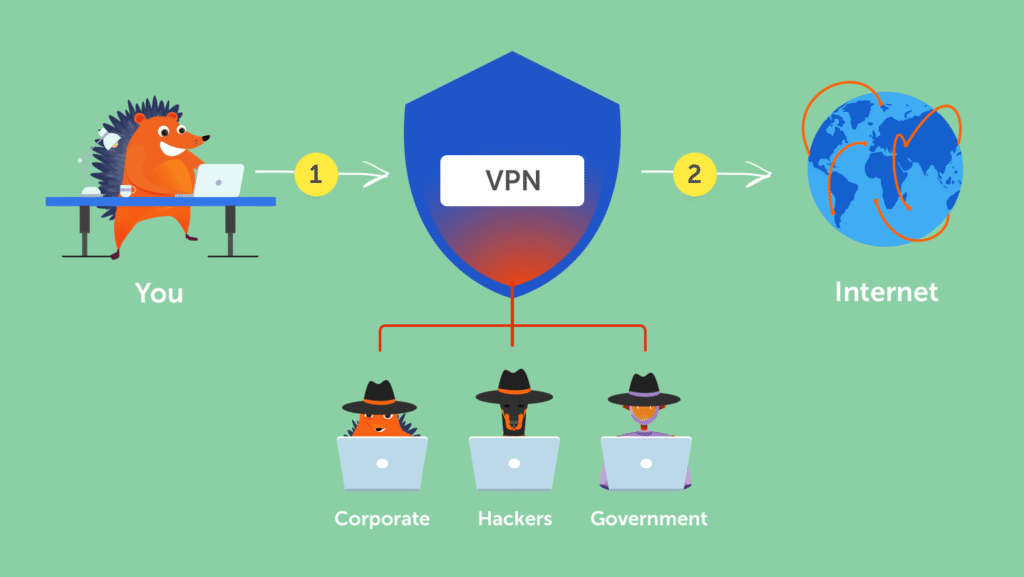
Misconfigurations, browser vulnerabilities, and “DNS leaks” can leave your real identity exposed to your ISP, hackers, or government surveillance—even while your VPN app says “Protected.”
In this guide, we will walk you through three essential, specialist-level tests to verify your VPN’s integrity. These tests take less than five minutes but could save you from a lifetime of data exposure.
Why You Can’t Trust the “Green Icon”
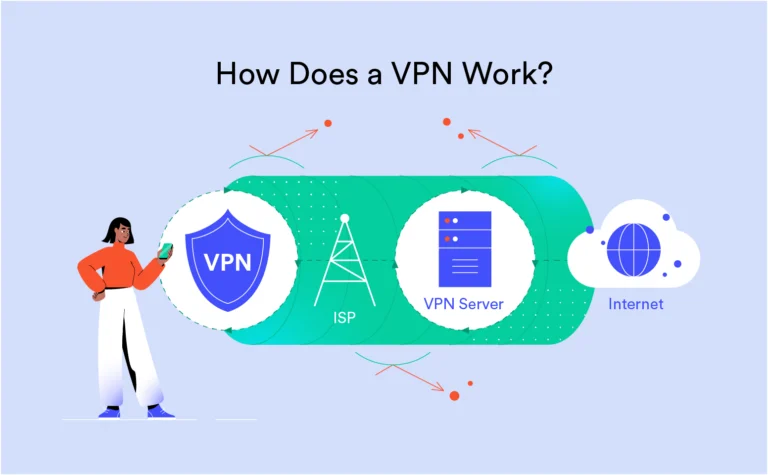
Before we dive into the tests, it is crucial to understand the “Illusion of Security.” A VPN creates an encrypted tunnel between your device and a remote server. However, modern web browsers and operating systems (Windows 10/11, macOS, and Android) are designed to be “helpful,” often trying to find the fastest route for data. Sometimes, they bypass the VPN tunnel entirely.
This is known as a leak. To ensure you aren’t a victim of one, you must perform these three manual audits.
Test 1: The IP Address Leak Test (The Baseline)
The most basic function of a VPN is to mask your IP (Internet Protocol) address. Your IP is your digital home address; it reveals your city, ZIP code, and your Internet Service Provider (ISP).
How to perform the test:
- Disconnect your VPN. Visit a site like WhatIsMyIP.com or IPLeak.net. Note down the numbers you see and the location (e.g., Muscat, Oman).
- Connect your VPN. Choose a server in a different country (e.g., London, UK).
- Refresh the page.
Interpreting the Results:
- Success: The IP address has changed to a new set of numbers, and the location shows the UK.
- Failure: If you still see your original IP or your local city, your VPN is failing at its most basic task. This usually happens due to a “Virtual NIC” error or a failure in the VPN’s routing table.
Expert Tip: If your ISP supports IPv6, make sure to check the IPv6 section on IPLeak.net. Many older VPNs only mask IPv4, leaving your IPv6 address wide open for tracking.
Test 2: The DNS Leak Test (The Invisible Threat)
Even if your IP address is hidden, your DNS (Domain Name System) requests might be leaking.
Think of DNS as the “phonebook” of the internet. When you type google.com, your computer asks a DNS server for the corresponding IP. If your VPN is poorly configured, these requests might still go to your ISP’s servers instead of the VPN’s private, encrypted DNS servers. This means your ISP can see every single website you visit, even if they can’t see what you do on those sites.
How to perform the test:
- Go to DNSLeakTest.com.
- Click on the “Standard Test” or “Extended Test.”
- Look at the list of servers.
Interpreting the Results:
If you are connected to a London server but the DNS results show servers belonging to your local ISP (like Omantel or Ooredoo), you have a DNS leak. A secure result should only show servers owned by your VPN provider or a neutral party like Google or Cloudflare (if configured).
Test 3: The WebRTC Leak Test (The Browser Vulnerability)
This is the “silent killer” of online anonymity. WebRTC (Web Real-Time Communication) is a technology built into modern browsers (Chrome, Firefox, Edge) to allow for seamless video and audio calling.
The problem? WebRTC can bypass your VPN tunnel to identify your “True” local IP address through a technique called STUN (Session Traversal Utilities for NAT).
How to perform the test:
- Visit BrowserLeaks.com/webrtc.
- Look for the field labeled “Public IP Address” or “Local IP Address.”
Interpreting the Results:
If you see your actual ISP-assigned IP address in these fields while the VPN is active, your browser is leaking your identity. This is not necessarily the VPN’s fault—it is a browser-level vulnerability.
How to fix a WebRTC Leak:
- Chrome/Edge: Install the WebRTC Network Limiter extension by Google.
- Firefox: Type
about:configin the address bar, search formedia.peerconnection.enabled, and set it tofalse.
Advanced Verification: The “Kill Switch” Audit
If you want to go beyond the basics, you must test your Kill Switch. A Kill Switch is a feature that immediately cuts your internet connection if the VPN drops, preventing “accidental” exposure.
The Real-World Test:
- Connect to your VPN.
- Open a continuous ping in your terminal (Command Prompt on Windows). Type:
ping google.com -t. - Abruptly close the VPN app via the Task Manager (force quit).
- Observe: If the “pings” continue to resolve and show successful replies, your internet is still active without the VPN. Your Kill Switch failed. If the pings stop immediately with “Request timed out,” your Kill Switch is working perfectly.
Summary Checklist for VPN Health
| Test Type | Tool to Use | What to Look For |
| IP Leak | WhatIsMyIP | Location should match the VPN server. |
| DNS Leak | DNSLeakTest | No servers from your local ISP should appear. |
| WebRTC Leak | BrowserLeaks | Your real public IP should be invisible. |
| Encryption | Wireshark | Data should appear as unreadable gibberish. |
The Verdict: Is Your Privacy Intact?
Privacy is an ongoing process, not a “set and forget” software installation. As we move deeper into 2026, the complexity of tracking—from AI-driven fingerprinting to quantum-decryption—will only increase.
If your VPN failed any of these tests, it is time to check your settings or switch to a provider that prioritizes Post-Quantum Encryption and Zero-Knowledge DNS.
For more deep dives into digital security and performance, stay tuned to vpntrackr. We don’t just track VPNs; we verify them.
External Authority Links for Further Reading:
- Electronic Frontier Foundation (EFF) – Surveillance Self-Defense
- WireGuard Protocol Documentation
- NordVPN’s Independent Security Audit Report
- OpenVPN Security Overview
🛠️ Instant Privacy Checkers
Don’t leave your security to chance. Use our proprietary vpntrackr diagnostic tools to verify your encryption strength and leak status in real-time.