Can My ISP Still See My Data Through a VPN? A Technical Deep-Dive
This article explains what Internet Service Providers can observe, how VPN tunneling and encryption actually work, and where privacy leaks commonly occur. The goal is a balanced and technically accurate overview — written in human language rather than marketing language.
What ISPs See Without a VPN
An Internet Service Provider acts as the primary gateway between a user and the public Internet. When a device initiates a network connection to a server, traffic necessarily flows through the ISP’s infrastructure. This provides visibility into several kinds of metadata.
Without a VPN, most ISPs can observe:
- Your public IP address assigned to your router or device
- Destination IP addresses for every server you connect to
- DNS queries if your DNS resolver belongs to the ISP or is unencrypted
- Timing and volume (when connections occur and how much data is exchanged)
- Cleartext HTTP traffic if any websites are not using HTTPS
HTTPS eliminates content visibility for most modern websites, but ISPs may still infer browsing activity from DNS traffic and destination IP addresses. Even without reading the content, patterns can still reveal behavior — for example, frequent connections to a streaming server, gaming server, or known social media domains.
What Changes When a VPN Is Used
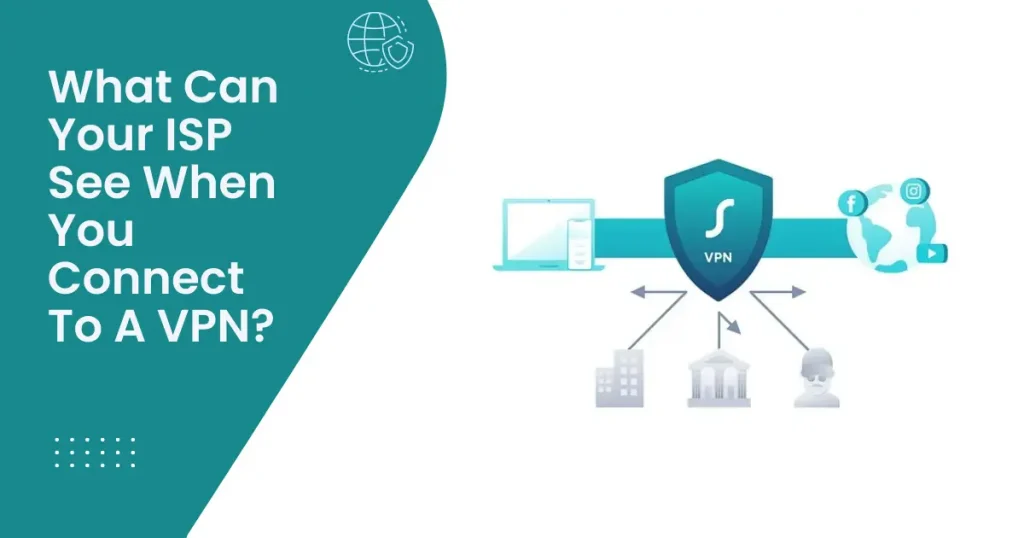
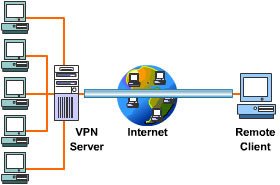
A Virtual Private Network encrypts IP packets and encapsulates them inside a secure tunnel between the user and a remote VPN server. The ISP no longer sees individual destination IP addresses; instead, it sees a single encrypted tunnel going to the VPN server itself.
With a VPN enabled, the ISP typically observes:
- One destination — the VPN server
- Encrypted traffic only (data cannot be inspected)
- Timing and volume remain visible at a high level
Once traffic reaches the VPN server, it exits to the public Internet. From the viewpoint of external websites, the connection appears to originate from the VPN server IP, not the user’s original IP.
Tunneling Protocols and Cryptography
Several VPN protocols exist, but modern deployments tend to favor WireGuard or well-configured OpenVPN. WireGuard uses a small codebase and modern cryptographic primitives (such as ChaCha20-Poly1305) which provide authenticated encryption and strong performance. OpenVPN offers flexibility and proven security but depends heavily on configuration quality — cipher selection, key exchange parameters, and TLS settings all matter.
In both cases, control channels establish secure handshakes and negotiate ephemeral keys. High-quality implementations ensure Perfect Forward Secrecy (PFS), meaning that even if a long-term private key is compromised later, previously recorded sessions remain encrypted and cannot be decrypted retroactively.
Layering with HTTPS
Importantly, most websites also use HTTPS, so there is encryption inside the VPN tunnel. This layered model offers extra protection:
- If the VPN is compromised, HTTPS protects the content
- If HTTPS fails on a website, the VPN preserves confidentiality at the network level
In practical terms, this reduces exposure across multiple threat scenarios. Some privacy-focused users consider it “defense in depth.”
Where Privacy Breaks: Leaks and Misconfigurations
A VPN does not automatically guarantee privacy. Users can still be exposed through DNS leaks, IPv6 leaks, or WebRTC leaks. These occur when the operating system or applications bypass the VPN tunnel, sending metadata outside of it.
DNS Leaks
A DNS leak occurs when domain lookup traffic reroutes to the ISP or another external resolver. Even if content remains encrypted, DNS requests map domain names to IP addresses, revealing browsing intent. A reliable VPN must enforce DNS inside the tunnel or use encrypted DNS protocols such as DoH (DNS over HTTPS) or DoT (DNS over TLS).
Many privacy-focused resources, including Mozilla and Cloudflare, publish research and tooling for encrypted DNS. For example, Cloudflare describes the risks of unencrypted DNS and how ISPs could potentially profile users using DNS metadata.
IPv6 Leaks
In dual-stack environments where IPv4 and IPv6 coexist, a VPN may only route IPv4 while leaving IPv6 traffic outside the tunnel. This can reveal the actual network identity, particularly on mobile networks. VPN software needs to either tunnel IPv6 or disable it safely. Several consumer VPNs advertise IPv6 protection, but active testing is the safest method to verify it.
WebRTC Exposure
WebRTC, a browser technology for real-time communication, can reveal IP information even while a VPN is active. Browsers such as Firefox and Brave allow direct control over WebRTC permissions, while extensions exist for Chromium-based browsers. Researchers and privacy communities often recommend scanning for WebRTC leaks using specialized testing pages.
Kill-Switches and Failover Behavior
If a VPN connection drops, the operating system may fall back to a regular network route, exposing the real IP address. A kill-switch prevents any outbound traffic unless the VPN tunnel is active. Some implementations use firewall rules, while others modify routing tables. A properly implemented kill-switch is considered mandatory for private torrenting or sensitive private browsing.
A good kill-switch has zero tolerance: no reconnection, no routing leaks, no DNS outside the tunnel.
Split Tunneling
Split tunneling routes selected traffic outside the VPN. It can be useful for banking applications or internal corporate systems, but it increases privacy risk. If the browser is excluded, then DNS and IP information leak instantly. Many VPN support requests originate from unintentional split-tunneling configurations.
Who Can Still See What?
With a secure configuration, the ISP sees an encrypted stream to a single VPN server. The content of the traffic and the list of websites accessed remain inaccessible at the ISP’s layer. However, the ISP can still observe:
- Encrypted packet sizes
- Total volume of data transferred
- Time of connection and disconnection
These metadata are generally insufficient for behavioral profiling compared to DNS logs and clear destination IP exposure. Nonetheless, in theoretical cases involving nation-state-level adversaries, traffic analysis is possible. For everyday users, the shift from visible per-site traffic to one opaque encrypted stream is a major improvement.
Trusting a VPN Provider
A VPN replaces one trust relationship (ISP) with another (the VPN service). Therefore, selection matters. Providers that undergo independent security audits and publish transparency reports inspire more confidence. Some offer RAM-only infrastructure, ensuring that no persistent logs remain on disk.
Well-known digital rights organizations such as the Electronic Frontier Foundation discuss how jurisdiction, policy, and technical controls combine to determine actual privacy guarantees.
Performance Characteristics
Encryption introduces overhead. WireGuard is optimized for low CPU usage and high throughput, whereas OpenVPN can be slower depending on settings such as cipher suite and transport protocol. Geographical distance to the VPN server significantly affects latency. A server located on the same continent typically yields the best experience.
Modern VPN providers use load-balanced server clusters and intelligent routing to reduce congestion. Some implement “multi-hop” routing, chaining multiple VPN servers to increase anonymity at the cost of speed.
Testing Your Setup
Verifying a VPN configuration is straightforward. Basic tests include:
- Checking public IP before and after connection
- Running a DNS leak test via a reputable testing site
- Verifying whether IPv6 is tunneled or blocked
- Confirming WebRTC behavior in the browser
Users performing torrenting or sensitive research often validate their configuration using packet capture tools or online IP leak analyzers. It is also recommended to retest after VPN software updates or changing network adapters.
Threat Models and Realistic Expectations
Understanding what a VPN can and cannot protect against requires a realistic threat model. For ordinary users, the goal is typically to prevent an ISP, unsecured Wi-Fi hotspot, or local network operator from observing browsing activity. A correctly configured VPN solves this by encrypting traffic and obscuring destination IP addresses.
However, a VPN alone is not designed to defeat browser fingerprinting, advanced user tracking scripts, or logged-in platform behavior (e.g., signing into a social network). Even though the ISP cannot see the visited website, the website may still identify the user using cookies, browser identifiers, or account credentials.
Jurisdiction and Data Retention Laws
Technical protections can be weakened if the provider operates in a jurisdiction with mandatory data retention rules. Privacy analysts frequently reference how some countries require ISPs or VPNs to store metadata. Conversely, some regions have stronger legal protections and do not oblige VPNs to keep logs.
A combination of factors matters:
- Where the company is legally registered
- Where servers are physically located
- Whether servers are owned or rented
- Internal access controls and auditing
Some privacy-focused VPNs regularly undergo independent audits to verify that logging practices match published policies. These audits are publicly available and reviewed by the security community. Transparency reporting has become an important trust indicator, especially for users who handle sensitive communications.
No-Logs Policies
“No-logs” is a commonly advertised feature, but the term is often used loosely. There is a difference between not storing content and not storing metadata. A strict no-logs VPN avoids saving:
- Source IP addresses
- Connection timestamps
- Bandwidth usage linked to identity
- Browsing destinations
A minimal level of operational statistics may still exist, but these should be aggregated and anonymized. When a provider publishes its policy and allows third-party verification, the claims gain credibility. Some well-known digital privacy organizations discuss the value of legal jurisdiction, technical controls, and open-source implementations as complementary safeguards.
Public Wi-Fi and Man-in-the-Middle Attacks
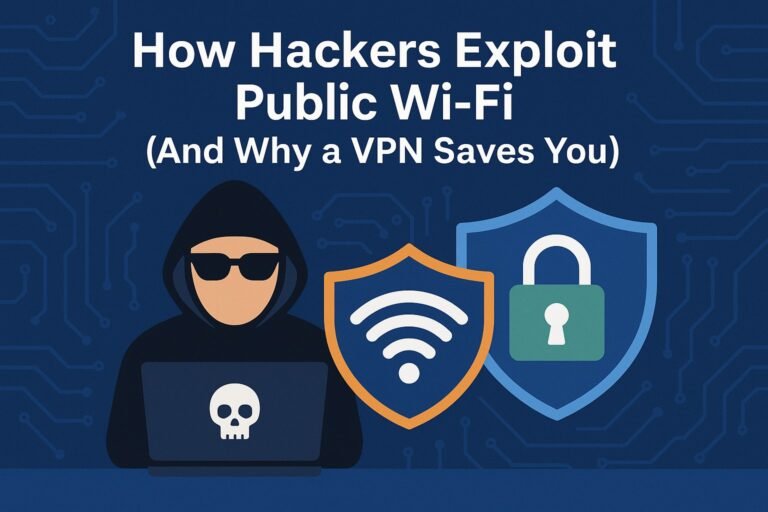
On public Wi-Fi networks, attackers sometimes attempt man-in-the-middle (MiTM) attacks to intercept unencrypted traffic. A VPN adds another encrypted layer, which protects even if the Wi-Fi hotspot or router is compromised. This is especially relevant in airports, hotels, cafés, and shared co-working spaces where network access is uncontrolled.
Even with HTTPS, a compromised network can still attempt DNS poisoning or redirection. A VPN that controls DNS inside the tunnel makes this significantly harder. Corporate cybersecurity guidelines commonly recommend VPN usage for remote work for this exact reason.
Deep Packet Inspection (DPI)
In some regions, ISPs use deep packet inspection to analyze traffic patterns or enforce content filtering. VPN encryption limits DPI visibility. While DPI may detect that a VPN protocol is being used, it cannot decrypt the payload when modern cryptography is implemented correctly.
More advanced VPN solutions use obfuscation layers that disguise encrypted tunnels to resemble ordinary HTTPS traffic, blending into normal Internet patterns. This technique is relevant in high-censorship environments or during network-level throttling.
Multi-Hop and Tor Integration
Some privacy-oriented users route their traffic through multiple layers, such as a VPN over Tor, or Tor over VPN. Each configuration has advantages and disadvantages. Multi-hop VPNs provide geographic separation between entry and exit nodes. Tor offers anonymity through a volunteer-run onion network. Both approaches introduce performance overhead.
Metadata Correlation
Although ISPs cannot see browsing content or destination addresses when a VPN is in use, timing and bandwidth remain observable. In theory, highly resourced adversaries could correlate traffic entering one network with traffic exiting another, especially if the target is small or behavior is predictable. For normal consumer scenarios, this level of analysis is impractical and unnecessary. For high-risk whistleblowing or journalism, operational security requires more than a VPN alone.
Device-Level Privacy Still Matters
A VPN protects network traffic, but it does not stop local tracking vectors. Advertising identifiers, browser cookies, and fingerprinting techniques can identify a user regardless of IP address. Privacy-conscious configurations may include:
- Private browser modes with strict tracking protection
- Regular cookie and cache clearing
- Using different browsers for sensitive tasks
- Disabling cross-site scripting trackers
This illustrates a core principle: real privacy is layered. A VPN is effective for hiding network-level behavior, but it is not a universal anonymity solution.
Streaming and Geo-Restriction Behavior
Streaming platforms detect VPN usage for copyright licensing enforcement. Some VPN servers work, others do not. This is unrelated to ISP visibility but often appears in user discussions. A failure to stream does not imply that the VPN is leaking; instead, platforms compare incoming IP ranges with known datacenter networks. The privacy integrity of the tunnel remains intact.
Corporate Networks and Monitoring
On employer-managed devices, traffic may be monitored at the device level with endpoint agents or proxy policies. Even if a VPN is active, the corporate machine may log browser activity. In these environments, the device itself cannot be trusted. A VPN is only effective when the user controls the device or at least controls the network layer.
Inbound and Outbound Links Used Naturally
Technical communities and cybersecurity organizations maintain resources to help users check for leaks, test DNS security, or verify HTTPS usage. For example, well-known DNS testing platforms provide simple public tools to detect whether DNS requests escape the tunnel. Similarly, some VPN comparison sites publish transparency scores based on audits and jurisdictional analysis. When referencing such material, it is standard practice to treat them as information sources rather than endorsements.
So, Can an ISP Still See Your Data?
In a properly configured VPN environment:
- The ISP cannot see which websites are visited
- The ISP cannot see content of communications
- The ISP can see connection duration and total bytes transferred
- The ISP can see one endpoint — the VPN server
From a privacy standpoint, this is a substantial improvement. Instead of observing a detailed list of individual domains, the ISP sees a single encrypted link. From a security standpoint, a VPN protects traffic on insecure networks and complicates certain attack vectors like DNS spoofing or local interception.
Balanced Conclusion
A VPN does not eliminate every form of tracking, nor is it a substitute for application-level privacy controls. But at the network layer, a VPN is one of the most effective and practical ways to prevent ISP-level monitoring. The protection is especially meaningful on public Wi-Fi or restrictive network environments.
Users seeking higher privacy should verify DNS, IPv6, and WebRTC handling, confirm kill-switch behavior, and choose providers with transparent auditing and strong jurisdictional policies. When combined with HTTPS and sensible device-level practices, a VPN gives strong, well-layered network privacy — and makes ISP surveillance significantly less useful.
The essential point is simple: with a reputable VPN and correct configuration, an ISP cannot inspect or meaningfully profile the contents of your online activity. What once was granular browsing visibility becomes an opaque encrypted stream, restoring a substantial amount of digital privacy.
Where to Learn More and Test Your Configuration
For users who want to validate their setup, several reputable resources offer public testing tools. Cloudflare publishes clear explanations of DNS security and the risks of unencrypted queries
(official documentation).
These materials help users understand how DNS leaks occur and why tunneling DNS inside a VPN prevents visibility at the ISP level.
Users connecting on airports, hotels, or open public Wi-Fi networks may also want to review guidance on preventing interception and redirection attacks. A detailed practical explanation can be found in our
Public Wi-Fi Safety Guide, which describes how unsecured routers expose traffic when a VPN is not used.
Final Summary
A VPN does not remove every tracking vector on the Internet, but it significantly reduces ISP-level visibility. The ISP sees only an encrypted tunnel, while the destinations and content stay hidden. When combined with HTTPS and sensible browser hygiene, a VPN is one of the most effective and practical tools for everyday privacy.
The core principle remains unchanged: encryption limits what intermediaries can observe. With a reputable provider and a properly configured client, ISP monitoring turns from detailed domain-level logging into a single opaque data stream. For most users, this shift restores a meaningful level of digital confidentiality.